 Saifullah Ahad
How I built it
 Dinig: Sound Cue RelayLive on Google Play
Dinig: doorbell alert for deaf
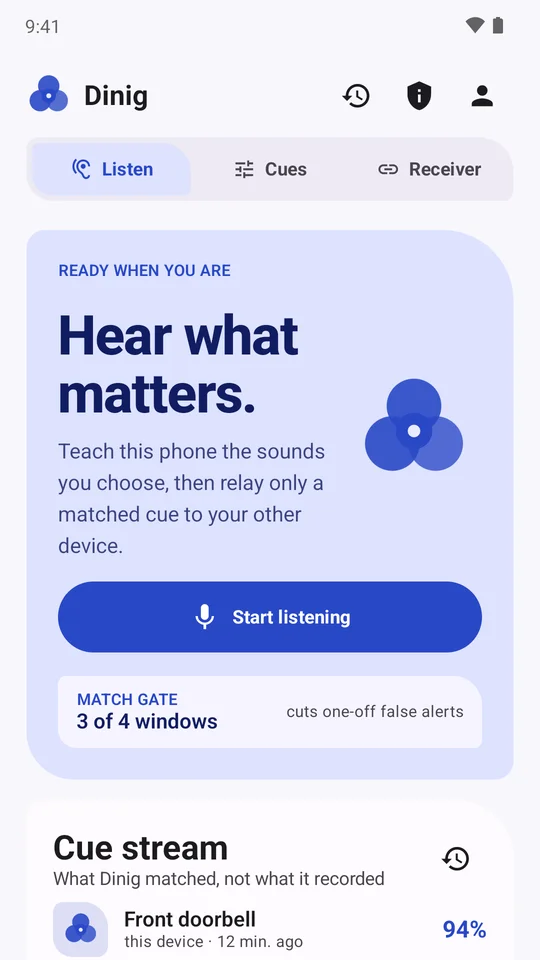
A spare Android phone placed by your front entrance can listen for your doorbell chime and relay a vibration and on-screen alert to the phone you carry. Dinig turns household sounds into compact numeric fingerprints without transmitting room audio across the web. Here is how the cue relay works, with its limits made clear.
01
The chime sounds in the hallway
A doorbell chime rings by the front entrance, but the sound remains contained near the doorway. For someone who is deaf, hard of hearing, in another room, or wearing headphones, an acoustic chime easily goes unnoticed.
Commercial alerting hardware exists, but many people already own an older Android phone they no longer use. Dinig was designed to give that spare device a purposeful task: listen near the entrance for your specific chime and send a silent cue to the phone you carry.
02
Three short examples become a fingerprint
Standard operating system sound notifications recognize a fixed list of common sounds on a single phone. Dinig focuses on the specific sounds you choose, such as your own doorbell tone, a timer, or a kitchen appliance click.
You train a cue by recording three brief sound samples on the listening device. The app extracts an acoustic frequency fingerprint and saves only that compact numeric pattern. The actual audio recordings are discarded immediately after enrollment.
03
The match gate: cutting one-off noise
Living spaces are rarely quiet. Footsteps, kitchen activity, and passing traffic produce sharp audio transients that can trigger false alarms if an app alerts on every sudden sound burst.
Dinig maintains an adaptive background noise floor so quiet room sounds are ignored. When an unusual sound occurs, the match gate requires the pattern to match in three out of four consecutive sound windows before confirming a cue. This multi-window verification helps eliminate isolated false triggers.
04
An encrypted label crosses the link, never audio
Streaming continuous room audio across networks creates unnecessary data exposure. Dinig avoids this by keeping all acoustic processing and microphone data strictly local to the listening phone.
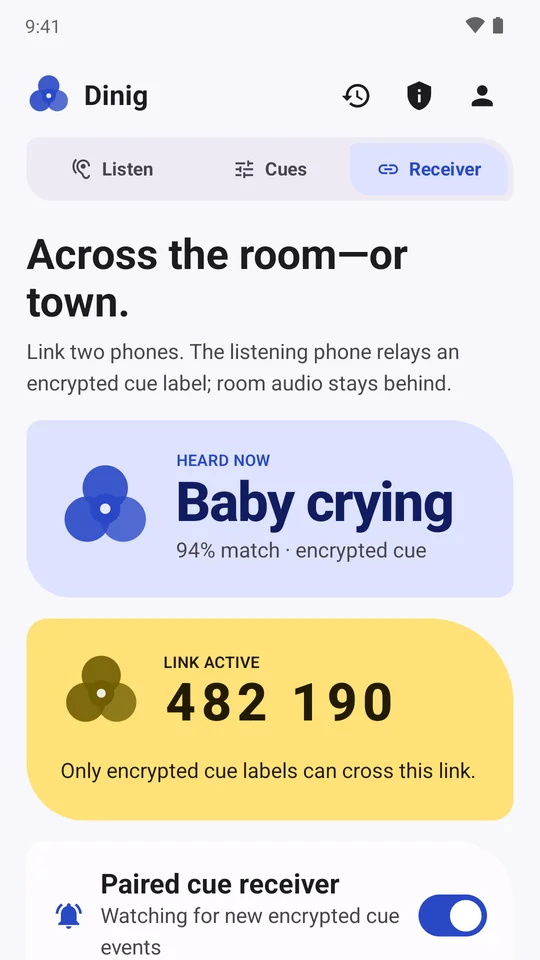
Two devices link through a temporary six-digit pairing code that expires after ten minutes. When the listening phone detects a matched sound, it uploads only the cue label, a match score, and a timestamp, all encrypted before transmission. No microphone feed or room audio ever leaves the listening phone.
05
Tactile alerts on the phone you carry
On your primary phone, turning on the receiver activates high-priority notifications, tactile vibration patterns, and in-app event displays whenever a cue arrives over the relay service.
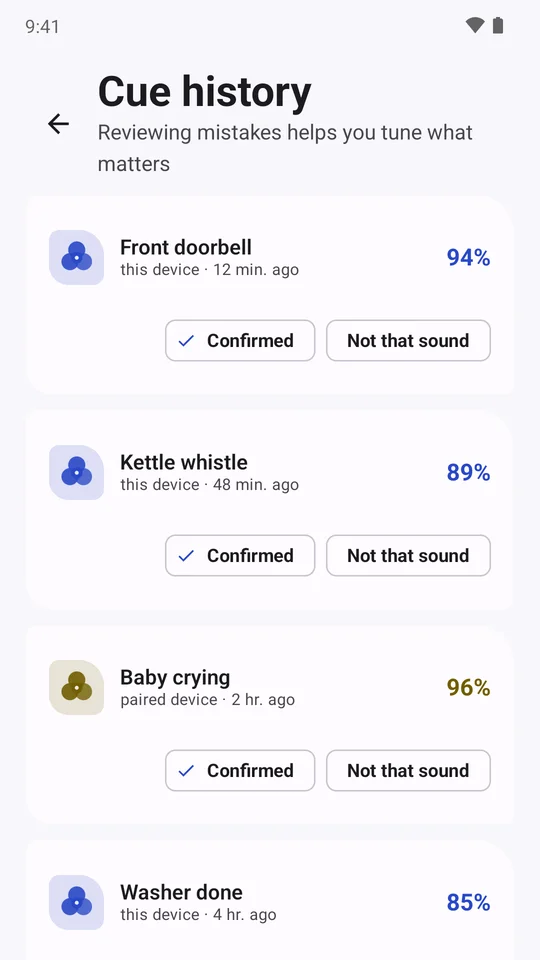
A local history log records received events with timestamps and confidence indicators. You can mark matches as right or wrong, toggle individual cues on or off, or disconnect the device link with a single tap.
06
Release testing and clear limits
Release verification was conducted on test bench hardware: a signed build was installed on an Infinix Note 8 (Android 10) and a Galaxy Tab S3 (Android 9). A temporary pairing code was generated, the tablet joined as a receiver, and a recorded test chime played on the bench was successfully recognized and relayed to the receiver display.
What remains unproven is equally important to state. Dinig was evaluated with recorded test tones on workbench devices, not with real doorbells in an occupied home, and not yet with deaf or hard-of-hearing users. It has no measured accuracy percentage. Both devices must maintain an active internet connection to exchange relay cues, and aggressive Android battery optimization on an unattended phone can stop background listening.
Dinig is an awareness aid for everyday household cues. It is not an emergency alarm, medical device, fire-safety monitor, smoke detector, or replacement for certified life-safety alerting equipment.
The design choice
Discard room audio at the microphone. Train on specific household chimes and relay only a brief encrypted label to the phone you carry.
How do deaf people know someone is at the door
When a standard chime cannot be heard, deaf and hard-of-hearing residents use visual, tactile, or networked alerts to notice visitors. This summary follows guidance from RNID and the National Deaf Children’s Society.
- Flashing and visual alerts. Wireless doorbell systems pair an outdoor push button with indoor plug-in receivers that flash bright strobe lights reflecting off walls to catch attention across rooms. Some units feature softer colorful lights suited for smaller spaces like bedrooms, and some have a silent flash-only setting.
- Vibrating pagers and wearable receivers. A transmitter at the front entrance communicates with a small pager or receiver you wear or carry. When the doorbell button is pressed, the receiver vibrates to alert the wearer in any room or the garden. Certain receivers include distinct vibration cadences to separate doorbells from other alarms, and can be placed under a pillow for night-time alerting.
- Amplified sound units. For people with residual hearing, extra-loud doorbells can reach volumes up to 100 decibels (dB). These systems typically offer adjustable volume controls, a choice of chime tones, and supplemental flashing lights.
- Smart and video doorbells. Connected to home Wi-Fi, smart doorbells send notifications with vibration or on-screen alerts to smartphones, smartwatches, or tablets. Some show a live video feed to show who is standing outside, and some integrate motion detection or trigger flashing smart lightbulbs through smart home platforms.
- Acoustic sound detector add-ons. In rented homes or apartment buildings with communal door entry systems where altering outdoor hardware is not permitted, an acoustic sound detector can be mounted indoors near the existing chime. It listens for the familiar sound and triggers a flashing light or vibrating pager without modifying building wiring.
- Local sensory support assessments. In the UK, residents may qualify for assistive technology support through their local council sensory services or social services department, which conducts an assessment to identify appropriate equipment.
How Dinig fits in: For someone with a spare Android phone, Dinig acts as a sound detector that listens for their existing doorbell chime and relays an encrypted cue to the phone they carry, without transmitting room conversations or ambient sounds over the internet.
Limits and unverified aspects: Dinig requires both devices to maintain an active internet connection to pass cues through the relay service. Tested on workbench hardware using recorded chime tones across an Infinix Note 8 and a Galaxy Tab S3, the app has not undergone trials in occupied homes, has not been tested with deaf or hard-of-hearing users, and has no established accuracy percentage. Long-term background battery longevity on an unattended listening phone remains unmeasured.
Safety notice: Dinig is an awareness aid for everyday household sounds. It is not an emergency alarm, medical device, fire-safety monitor, carbon monoxide detector, or replacement for certified life-safety alerting equipment.
More build stories: How to check a used phone before buying · How to check if your electricity meter is running fast · Eelj: a fair turn for a village’s one harvester · Practicing stuttering techniques at home · Where and when to look for the new crescent moon · How to split electricity bill with roommates · Milk fat SNF rate calculator, step by step · How to check a link before you click it · How to calculate cattle weight without a scale · How to settle who owes who in a group · Braille translator that explains every cell · Math learning gaps: where to start when a child is stuck · How to describe a car noise so a mechanic can find it · Convert Rumi to Jawi, then check the spelling · How to sync SRT subtitles with video · How to measure land area with phone GPS · Quran pronunciation app, tap any word to hear it · Lipi: Bangla keyboard, side by side with Ridmik · How to check an overseas employment contract · Extract data from graph image on Android · VaporSill: how to tell if damp or condensation
Work with me
Have a problem an app could solve?
Tell me what people need to do, and where the current process fails. You can read more of my work or contact me directly.