 Saifullah Ahad
How I built it
 TactiGlyph: Braille ToolsLive on Google Play
TactiGlyph: a braille translator that explains every cell
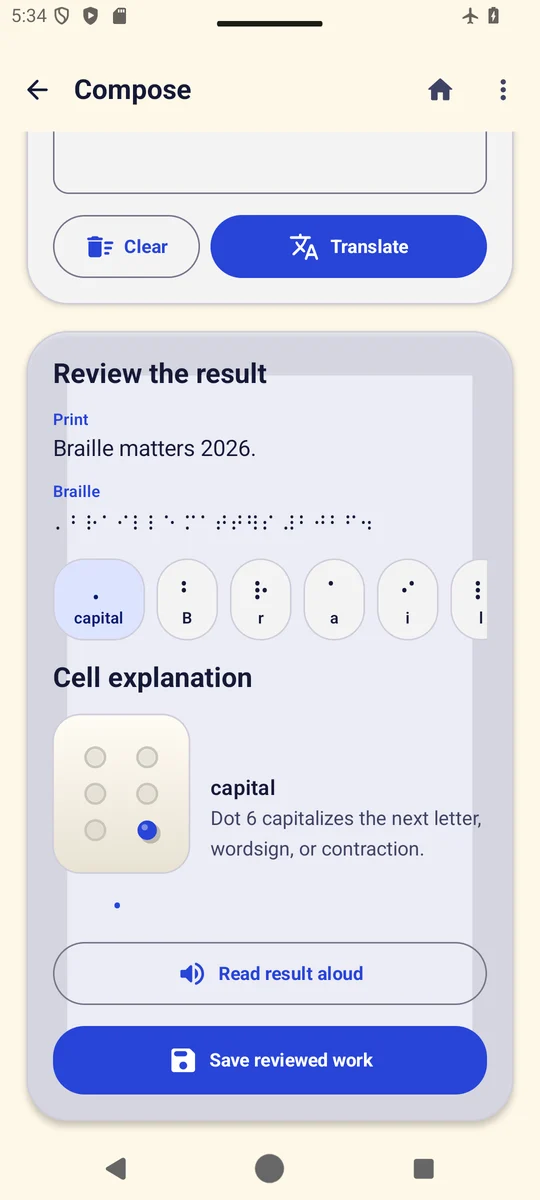
A braille translator is most useful when you can see why each cell means what it means. TactiGlyph turns print into six-dot braille and back for a clearly limited part of Unified English Braille, explains every cell, and never accepts its reading of a photo until you have checked it.
01
The problem: a translation you cannot check
A parent, a teacher or a support worker who is learning braille can get a translation from many tools. What is harder to get is the reason: which dots form this letter, why one cell became a whole word, and what the tool was unsure about.
TactiGlyph is for learners, educators, families, blind and low-vision users, and accessibility support workers. It was built to explain its results instead of hiding them.
02
The plan: a limited code, said out loud
Unified English Braille is large. Instead of claiming all of it, the plan set a boundary and wrote it down: six-dot letters, digits, the capital, number and grade-one indicators, an explicit punctuation table, alphabetic wordsigns, and a bounded set of common contractions.
The app shows this scope in its own reference. It is not a complete literary, technical, mathematics, music or multilingual braille transcriber, and it says so.
03
The build: six dots you can touch
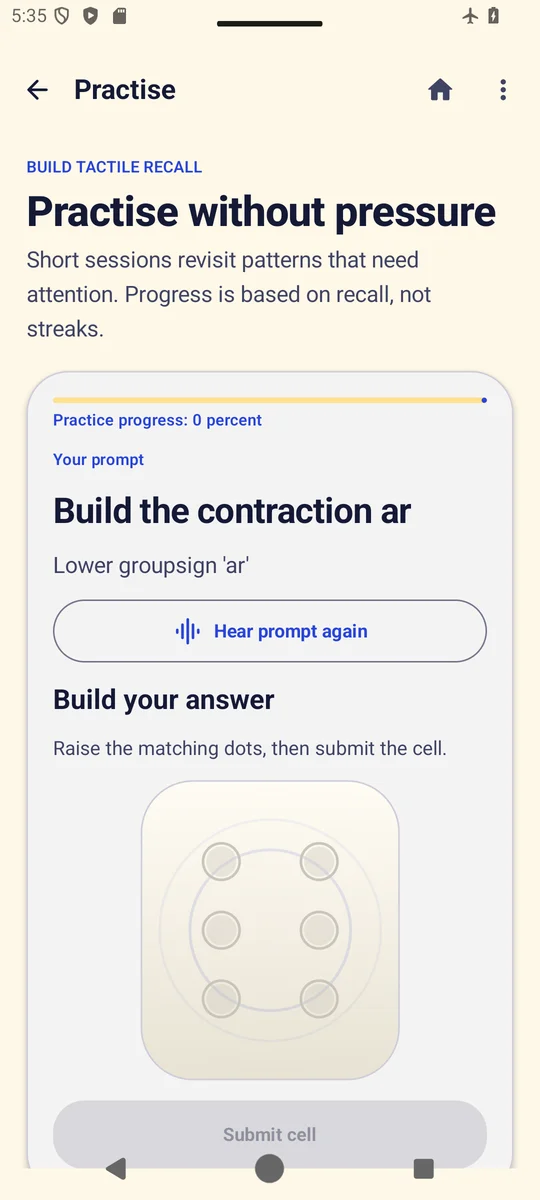
AI coding agents built TactiGlyph from my written specification. You can raise and lower each of the six dots, type print, or start from a photo of an embossed page. Each result is broken into cells, and each cell gets a plain explanation, speech and haptic feedback.
Work is saved in a searchable notebook and can be exported as plain text, Unicode braille, BRF-ready text or a PDF.
04
The rule that mattered most: a photo is only a suggestion
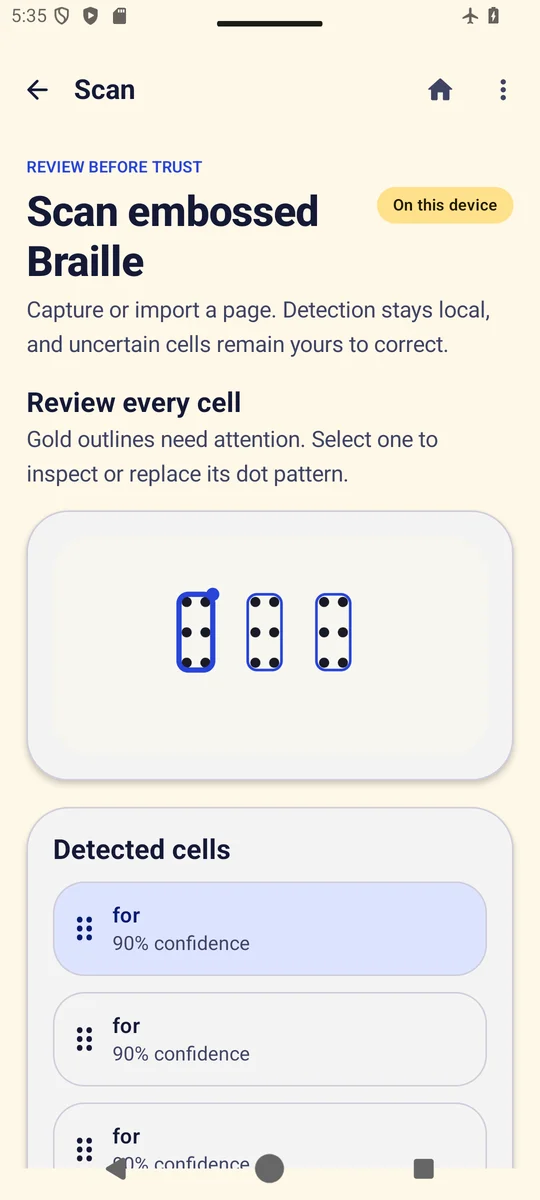
Reading dots from a photo can go wrong: light, shadow and the angle of the page all change what the camera sees. So the specification made one rule non-negotiable: the app never auto-accepts what it reads from an image.
Every detected cell is shown with its confidence, uncertain cells are marked for attention, and you can inspect or replace any dot pattern before saving. The photo itself is not copied into your saved work.
05
What the tests cover, and what they do not
The project carries tests for the translator: the full alphabet uncontracted, all 23 alphabetic wordsigns round-tripping, capital and number indicators, numbers with commas and decimal points, wordsigns that expand only as whole words, the longest contraction winning (as in “standing”), punctuation and quotes. The image reader’s tests use computer-drawn pages of six-dot cells and a sample picture, and they check that the result always asks for review.
The missing proof matters. No record shows the image reader tested on a photo of a real embossed page, and no record shows a braille reader or teacher using the app. I am not claiming either.
06
Where it stands
TactiGlyph: Braille Tools is live on Google Play. It is a learning and checking tool for a limited part of Unified English Braille, not certified transcription. If you read or teach braille, I would value your honest view of where it gets things wrong.
What this shows about how I work
- A clear boundary is more useful than a vague promise of full coverage.
- When software reads the physical world, a person should confirm the result.
- Tests on drawn images are not tests on real pages; I say which is which.
How to read braille by hand: the cell, the dots and a few letters
You do not need a braille translator to read a short word. You need the cell, its dot numbers and a chart.
- Know the cell. The American Foundation for the Blind puts it this way: “A full braille cell consists of six raised dots arranged in two parallel rows each having three dots.” It adds: “The dot positions are identified by numbers from one through six.” Dots 1, 2 and 3 run down the left side of the cell; dots 4, 5 and 6 run down the right.
- Learn the first letters by their dots. a is dot 1. b is dots 1 and 2. c is dots 1 and 4. d is dots 1, 4 and 5. e is dots 1 and 5. f is dots 1, 2 and 4. Read each cell, write down its dot numbers, then look them up.
- Watch for signs that change the next cell. In Unified English Braille, dot 6 before a letter makes it a capital. A number sign before letters a to j turns them into digits.
- Know whether the text is contracted. The AFB explains: “When every letter of every word is expressed in braille, it is referred to as uncontracted braille.” Most books use contracted braille, where “cells are used individually or in combination with others to form a variety of contractions or whole words.” So one cell can stand for a word like “and” or “for”.
- Check the code. The AFB notes that “as of 2016 the main code for reading material is Unified English Braille” in the United States. Older material may follow an earlier code.
Braille translator from a photo: what to expect
A photo of embossed braille depends on light and angle, so treat any reading from an image as a first draft and check each cell against the page.
TactiGlyph helps by explaining every cell it translates and by asking you to review every cell it reads from a photo.
Source, read October 10, 2026: American Foundation for the Blind, What Is Braille? The letter dots come from TactiGlyph’s own braille table.
More build stories: How to check a used phone before buying · How to check if your electricity meter is running fast · Eelj: a fair turn for a village’s one harvester · Practicing stuttering techniques at home · Where and when to look for the new crescent moon · How to split electricity bill with roommates · Milk fat SNF rate calculator, step by step · How to check a link before you click it · How to calculate cattle weight without a scale · How to settle who owes who in a group · Math learning gaps: where to start when a child is stuck · How to describe a car noise so a mechanic can find it · Convert Rumi to Jawi, then check the spelling · How to sync SRT subtitles with video · How to measure land area with phone GPS · Quran pronunciation app, tap any word to hear it · Lipi: Bangla keyboard, side by side with Ridmik · How to check an overseas employment contract · Extract data from graph image on Android
Open to work
Let's build your AI product system.
Full-time roles — remote anywhere, hybrid in Bangladesh, or on-site abroad: AI Product Builder, AI Product Manager, AI Workflow Orchestrator, Product Delivery Lead.
Based in Dhaka, Bangladesh (UTC+6) · works any time zone · can start now · ready to relocate with visa sponsorship.