 Saifullah Ahad
 UseSoonLive on Google Play
Pantry inventory app: keep track of what to use first
A pantry inventory app is only as good as the list in it, and a list only helps if the shelf behind it is in order. Two university extension pages say how to set the shelf up and what the dates on packages mean. UseSoon, an Android app where you type in what you have, comes after.
Illinois Extension on checking first
“When meal planning, it’s important to first check to see what you already have on hand. This can prevent you from buying more than what you need.”
From “Prep Your Pantry”, University of Illinois Extension, Eat.Move.Save.
How to keep a pantry inventory list that works
Whether the list lives on paper or in a pantry tracker app, the same few habits sit under it. These come from the two sources, in their words.
-
Group the shelf by category
“Try to organize your pantry by category. Store similar items together, such as pastas and other grains, or dried and canned beans.”
Illinois Extension -
Put the oldest in front
“The oldest item should go in front and place the newer item in the back. This helps you use up the older items before they expire. It also prevents you from having multiple open containers of the same item.”
Illinois Extension, on the rule it calls “FIFO” or “first in, first out”“Focus on consuming earliest purchased food items and items whose shelf life is the shortest.”
Utah State University Extension -
Date what you put away
“Label your leftovers or cooked foods with the current date and contents before putting them in the refrigerator or freezer.”
Utah State University Extension -
Check the shelf before you shop
“While you are searching your pantry, you can see if anything you have is expiring soon. These are the best items to use first when meal planning so that they don’t go to waste.”
Illinois Extension“Only buy and store items you will consume, even if they are on sale.”
Utah State University Extension
Sources: “Prep Your Pantry”, University of Illinois Extension, Eat.Move.Save. (the page shows no date; I read it on November 13, 2026), and “Food Waste Prevention Part 5: Food Labels and Food Safety”, Utah State University Extension (its page data gives March 31, 2021, changed December 14, 2023). Both read in full. Both also cover fridge storage and spoilage; this page leaves that with them.
What the date on a package means
The dates you copy into a list come from the package, so it helps to know what they are. Utah State University Extension says: “The U.S. does not yet have federal regulations standardizing the use of date labels on foods, so knowing whether there is a food safety concern can be confusing for the consumer.” Its table, as it words it:
| Label | What the date means | What it adds |
|---|---|---|
| “Best if Used By” | “Date indicates when a product will be of best flavor or quality.” | “Not a purchase or safety date. Examine foods that are passed this date. If the products have any noticeable changes in color, consistency, or texture, you may want to avoid eating them.” |
| “Sell-by” | “Date tells the store how long to display the product for sale for inventory management.” | “Not a safety date.” |
| “Use-by” | “Date is the last date recommended for the use of the product while at peak quality.” | “It is not a food safety date except for when used on infant formula.” |
| “Freeze-by” | “Date indicates when a product should be frozen to maintain peak quality.” | “It is not a purchase or safety date.” |
Source: Utah State University Extension, same page as above. If you are unsure about a particular food, the label, the maker and local food safety guidance are the places to ask. This page does not judge any food.
An example, not a source and not from a real kitchen
Say the shelf holds the three sample items UseSoon starts with: spinach with a date one day away, yogurt three days away, rice forty days away. Following the sources, the spinach goes in front and into the next meal, the yogurt comes next, and the rice can wait. A list that sorts by date shows the same order:
- Spinach, fridge1 day left: first
- Yogurt, fridge3 days left: next
- Rice, pantry40 days left: later
That is the whole idea of an inventory with dates: the list does the remembering, and you still decide.
What UseSoon keeps in its list
UseSoon: Food Use Planner is an Android app for fridge, freezer and pantry items. You type each item in yourself: a name, a quantity, where it is kept, a category and a use-by date. Then it sorts what you entered by how close the date is.
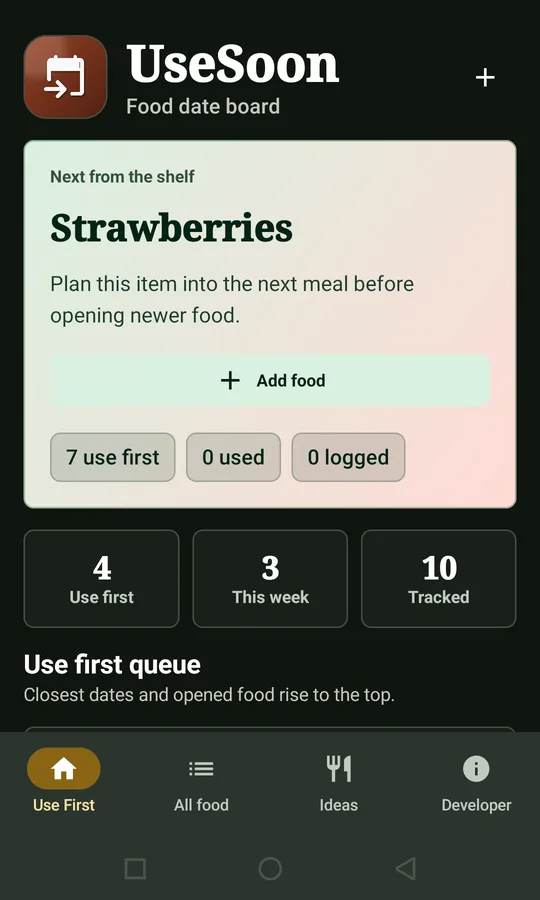
The use first queue
The Use First tab opens on Next from the shelf, the item with the nearest date, with a line on what to do next. Under Use first queue come items that are past their date, due within two days (Use first) or due within a week (This week), up to five at a time. Each has a Used button. Items are ordered by that group, then by date.
The home screen with example entries such as Strawberries and Leftover curry.
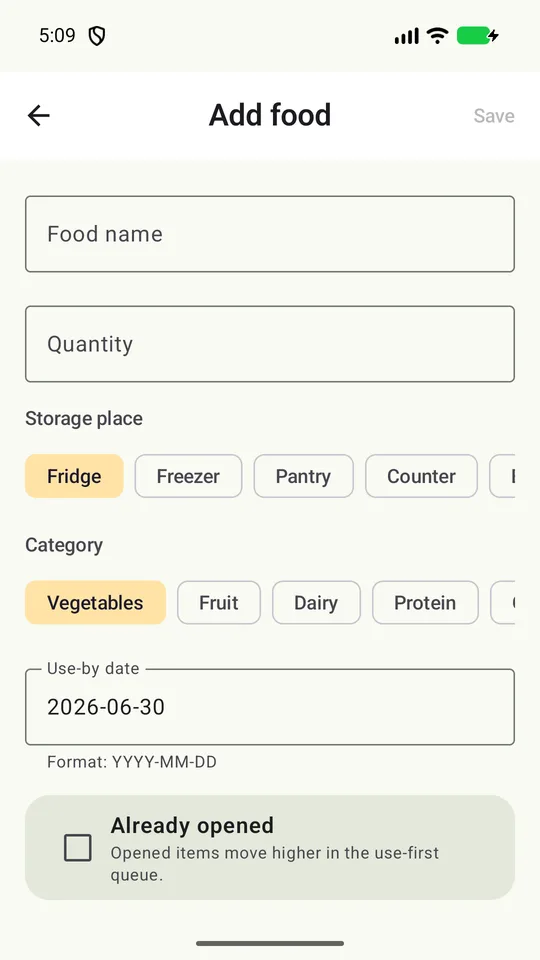
Typing an item in
The Add food screen has Food name, Quantity, Storage place (Fridge, Freezer, Pantry, Counter, Bag), Category (Vegetables, Fruit, Dairy, Protein, Grains, Leftovers, Pantry, Other), Use-by date typed as YYYY-MM-DD, an Already opened box and Notes. The All food tab lists everything and has Search food or place and a category filter.
The empty Add food screen, with the date format note under the date field.
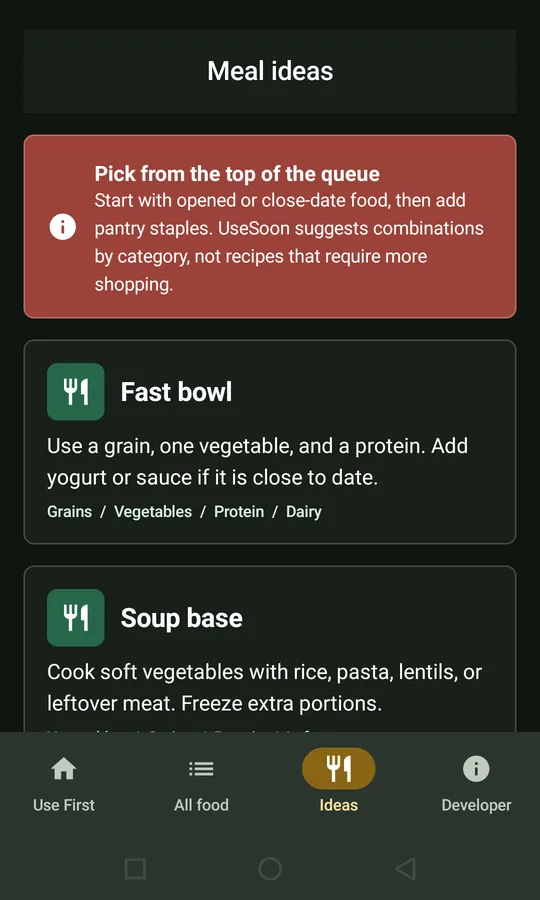
Meal ideas
The Ideas tab shows four fixed ideas: Fast bowl, Soup base, Breakfast rescue and Pantry cleanout. Each is a short line and the categories it suits. The ones that share the most categories with your nearest-date items come first. The app says: “UseSoon suggests combinations by category, not recipes that require more shopping.”
The Meal ideas screen: the guidance card and the first two ideas.
Where it stops
- You enter every item by hand. Nothing fills the list for you.
- No recipes with amounts or steps, only the four ideas above.
- It does not decide whether any food is fine to eat. Its own store text says: “UseSoon is a household organizer, not a food safety authority. Always follow food labels, storage instructions, local guidance, and your own judgement.”
- The Already opened screen note says opened items move higher in the queue. In the code I read, the order uses the date group, the date and the name only, so I do not claim that. I did not run the app to see it.
- No account, no household sharing. The share icon on Food detail sends a plain text note about one item through Android’s share sheet.
What it keeps, and where
Food names, quantities, dates, notes and used or waste marks stay in the app’s own storage on the phone. The privacy policy says the food planning data “is not uploaded to the developer by the app,” and that items stay until you delete them in the app or uninstall it. Delete item removes one.
The one thing that goes online is the optional Send feedback form on the About Developer screen, sent through a mail relay only when you submit it. That is why the app lists internet and network state permissions; the policy says it does not ask for location, contacts or notification permissions.
What I did not check
I read the store listing, the code and its text, the manifest and the privacy policy, and I opened the store pictures. I did not run the app. The project has no tests, so I cannot say how it behaves on a particular phone or with a long list. I did not check whether using it wastes less food, and I give no number for that.
Get it
An Android app on Google Play, for keeping dates in one place and seeing what comes first.
View UseSoon on Google PlayUniversity of Illinois Extension
“Prep Your Pantry”, on the Eat.Move.Save. site. Read in full on November 13, 2026; the page shows no date. Used for grouping by category, putting the oldest in front and checking the shelf before shopping.
Utah State University Extension
“Food Waste Prevention Part 5: Food Labels and Food Safety”. Read in full. Used for the date label table, dating leftovers, buying only what you will consume and the first-in, first-out rule.
Standing in front of the shelf?
Start with the oldest and the nearest date, and write the date on what you put away.