 Saifullah Ahad
 SulharaLive on Google Play
SAIFULLAH AHAD / BUILD STORY
A family media agreement your child helps write, and keeps
A family media agreement is a short, shared set of rules about screens that parents and children write together, so a rule is something the child agreed to and not only something handed down. This page covers what to put in it, how to handle a request for more time, how to give more freedom as trust grows, and when to look at it again.
Start with the child in the room
The American Academy of Pediatrics, in How to Make a Family Media Plan, opens its advice with one idea:
"Every family is different, so create a plan that fits your routines and values. Discuss them with your kids."
That is the heart of a family screen time agreement. Sit down at a calm moment, not in the middle of an argument, and ask the child what a fair day looks like. Write down what you both say. The same page adds that the plan covers everyone: "Make sure to create a plan for every member of your family, including yourself." If the parents will be on their phones at dinner, the agreement should say so.
What to agree on
A screen time contract for kids does not need to be long. Four things are enough to begin with:
- Places and moments with no screens. The Academy suggests screen-free zones, "such as the dinner table, during homework and before bed". Let the child pick one of them.
- Kinds of use. Study, chatting, video and games feel different to a child, so they are easier to talk about one at a time than as screen time in general.
- A time for each kind, if you want one. Only your family can say what is right for your child, so write the number you both accept and nothing more.
- What happens when someone wants to change it. This part is easy to leave out, so the next section is about it.
Common Sense Media, a nonprofit, offers planners for three age groups and describes why they help: "tech planners are a great way for kids to have a shared understanding of how your family makes the most out of entertainment and tech time." Its planners start from three questions a child can answer: "What will I do? How much time will I spend? Am I making thoughtful choices?" You can read them on its Family Tech Planners page.
When your child asks for more time
A rule with no way to ask for an exception gets broken, because breaking it is the only way to get an exception. Put the asking into the agreement itself:
- The child says how much extra time and why, in a sentence.
- The parent answers yes, no, or a smaller yes, and gives a reason for the answer.
- Both of you can see afterwards what was asked and what was decided, so nobody has to argue from memory.
A smaller yes is worth practicing. Ten extra minutes for a real reason teaches the child that a good reason works. A flat no every time teaches that asking is pointless.
Giving more freedom as trust grows
An agreement that never changes will feel like a cage by the time the child is older. Agree up front what earns more say. For example, a set number of weeks of keeping the agreement could let the child choose their own evening window, then make one small request without asking, then propose next week's numbers before the parent does. Write the steps down while everyone is calm, so nobody feels the ladder was invented to suit one side.
When to look at it again
The Academy is direct: "Revisit and revise your plan often." It names the moments: "The beginning of each school year or during summer and holiday breaks are great times to review your plan." And it explains why: "plans should evolve as your child matures and develops." Put the first review date in the agreement itself, and let the child bring one change they want.
How Sulhara helps two Android phones keep the same agreement
I built Sulhara: Family Screen Pact for the part that paper does not handle well: both people seeing the same current version, and requests that do not turn into standoffs. Its tagline is "Two seats. One shared pact." The name comes from sulh, a settlement that ends a dispute between two sides.
- Two seats. On first launch it asks "Which seat is this device?" with "Parent seat" and "Child seat". The parent shows a six-character invitation and the child joins with it. "No email, phone number, or child account is needed." and "The code expires after 24 hours."
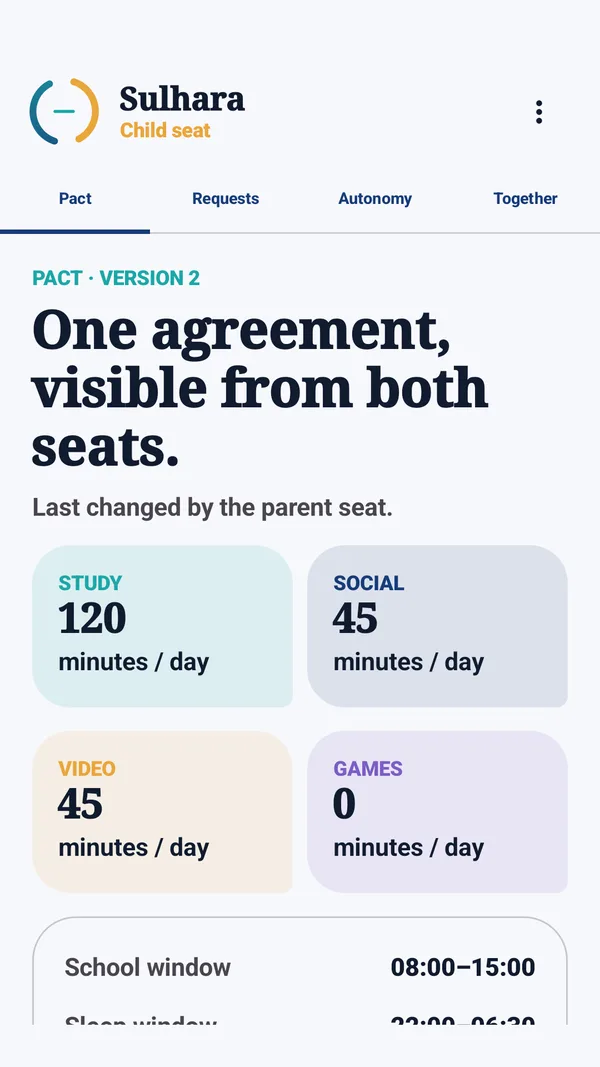
- One pact. The Pact tab holds daily minutes for study, social, video and games, plus a school window and a sleep window. A change goes through "Propose the next pact" and "Publish version", and both seats see which version is current and who changed it.
- Requests with a reason. The child sees "Ask with a reason." and "Why is this extra time useful?", then "Send request". The parent sees "Answer without a standoff." with "Approve", "Counter" and "Deny", and the counter button offers "Offer 10 minutes". "Every request keeps its reason, timing, and decision visible to both seats."
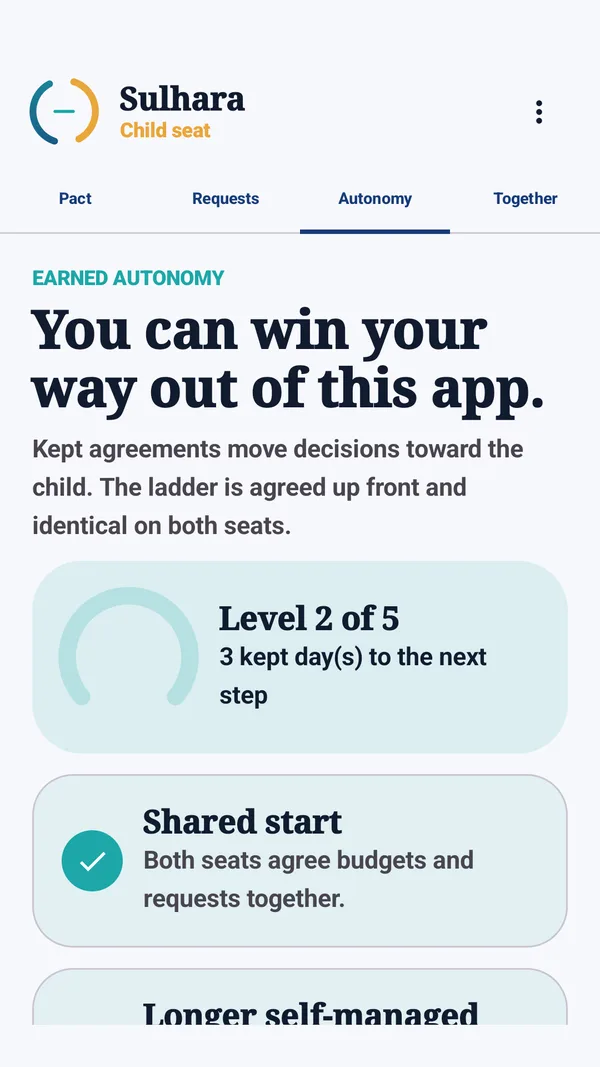
- A ladder of trust. The Autonomy tab says "You can win your way out of this app." It has five levels, from "Shared start" to "Visibility-only pact reached". "Kept agreements move decisions toward the child. The ladder is agreed up front and identical on both seats."
What happens when the time is used up
Group totals are counted on the child's phone. When a budget is spent, the app can show a visible pause screen and pause the internet only for that group's apps. It does this with a VPN that runs on the child's phone: traffic is dropped there, and nothing is inspected, rerouted or logged. App names and history stay on the child's phone. If the internet drops, a same-Wi-Fi fallback carries requests and decisions.
The child can switch enforcement off. The app does not hide that: "Enforcement is visible and can be disabled. Both seats then see a plain record of that change." Either seat can choose "End pairing and delete shared family data", which deletes the shared pact, requests and record for both seats. The Sulhara data handling page has the details.
Honest limits and what was not checked
- It is not a legal contract, and it gives no advice on how many minutes are right. That is for your family to decide.
- It needs two Android devices, one for each seat.
- The child can turn enforcement off. The parent then sees that it happened. It is visible by design, never secret.
- I checked the release build on two devices, an Infinix phone as the parent seat and a Galaxy Tab S3 as the child seat. Pairing by code worked and the child's request reached the parent.
- It has not been checked with real families over weeks, so I cannot say how well it holds up in daily life.
- The pictures above show sample numbers.