 Saifullah Ahad
 SkammturLive on Google Play
SAIFULLAH AHAD / BUILD STORY
A restaurant prep list template, and how to size the numbers on it
A restaurant prep list template is a one-page sheet that says what to make before service and how much of it, and the useful part is the column you fill in after service.
The sheet itself
A good restaurant prep list stays small. Put only the items that go off or lose quality if you make too many: soups, rice, sauces, cut fruit, drinks. Leave out dry stock. Copy these columns onto paper, a whiteboard or a spreadsheet, one row per item.
| Item | Batch size | Target to prep | Prepped | Sold | Left over | Sold out early? |
|---|---|---|---|---|---|---|
| Chicken rice | 5 portions | 50 | ||||
| Lentil soup cups | 6 cups | 36 | ||||
| Mango drink | 8 cups | 40 |
The first three columns are the plan. The last four are the record. A kitchen prep list template with no record columns can only repeat last week's guess.
Five steps to fill it in
- Pick a batch size for each item. If a pot makes six cups, the sheet should only ever say 6, 12, 18. A target of 14 means nothing to the person at the stove.
- Write a starting number you believe. For a new item this is a guess. That is fine, as long as the sheet shows it is a guess.
- After service, fill the last four columns. Prepped, sold and left over should add up. If they do not, someone counted wrong or an item went elsewhere, and it is better to notice that today.
- Tick "sold out early" honestly. A sold-out day tells you demand was at least the number sold, not exactly that number. Treat those rows as a floor.
- Once a week, read the rows for the same weekday. Friday and Tuesday are rarely alike. Move the target toward what that weekday really sold, then round to a whole batch.
Two outside sources explain why the record matters. Penn State's open textbook on food production says: "Using the history of past sales in your foodservice operation is critical when attempting to accurately forecast future sales." In the same lesson, Lesson 1.3: Sales History and Forecasting by Beth Egan, a limit is named too: "It is not enough to only look at the past to predict the future." So keep the sheet, and add what you know about today, such as weather, a market day or a holiday.
The US Environmental Protection Agency page Prevent Wasted Food Through Source Reduction lists "Examine production and handling practices to prevent and reduce preparation waste." as one approach, and describes preventing food waste as "growing, buying, and preparing only what is needed". Your left-over column is the plainest way to see what a given day's prep looked like.
Where Skammtur fits, and where it does not
I built Skammtur: Prep Forecast for one food seller, such as a stall or a small kitchen. It is not a checklist of prep tasks. It keeps the record columns above for you and turns them into a suggested quantity for each item.
- Setup. You create an account with an email and password. Under "Stall settings" you search for your city or place by name and pick it, set a prep alert time and a service start time. The app asks for no location permission.
- Menu. On "Menu" each item has "Opening" (your starting estimate), "Batch", "Minimum" and "Maximum", plus two trade-off weights from 1 to 100, "Waste" and "Sold out". The menu screen says "These limits always outrank the forecast."
- Prep tape. Each item gets "LOW", "TARGET" and "HIGH", snapped to your batch size and kept between your minimum and maximum, with a "TOTAL TARGET" on top. The screen says "Cost-balanced quantities, not a promise. Read the range before prep."
- Closeout. After service, "Closeout tally" asks for "Prepared" and "Sold" per item and a box, "Sold out before service ended". It says "Sold + left over must equal prepared."
- Evidence. The "Evidence" screen lists, for each item, the reasons behind the numbers, such as how many shifts were recorded and how many matched the weekday.
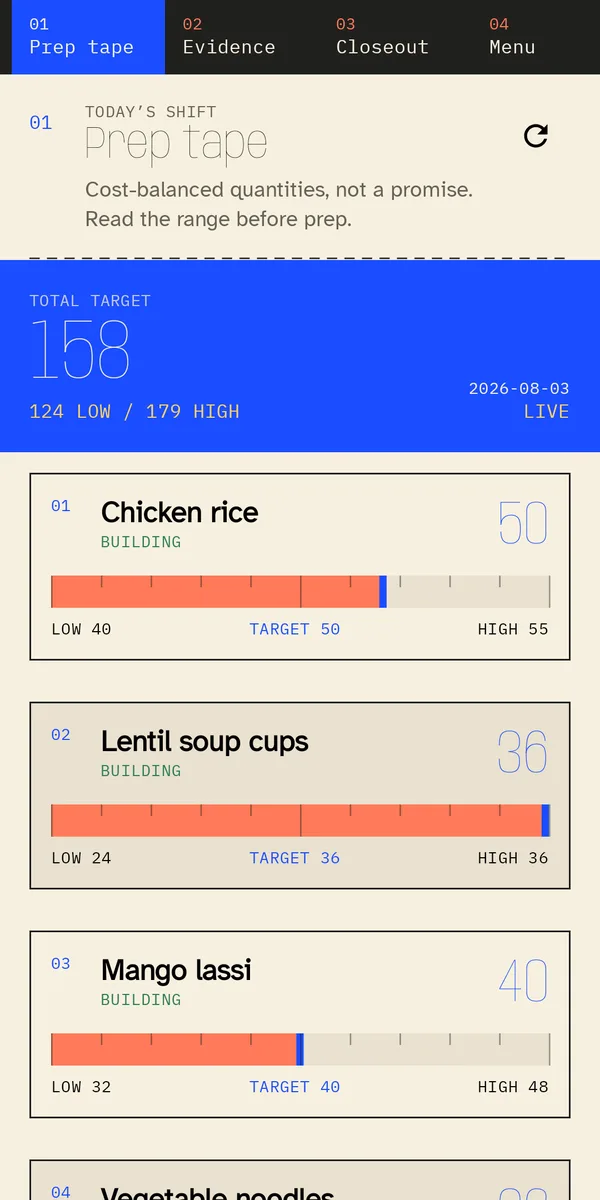
How the estimate is made
The estimate is worked out on the app's own server, not on the phone. From the code, in plain words:
- With no recorded shifts, it starts from your "Opening" number. With a few, that number still counts for a while, so one odd day does not swing everything.
- Recent shifts count more than old ones, and shifts on the same weekday as the day being planned count more again.
- A shift marked sold out is treated as a minimum, so the app assumes real demand was at least that high.
- The numbers you set for "Waste" and "Sold out" decide how far above or below the middle guess the target sits. The low and high are the two ends of the range around it.
- The range is wider when there are few recorded shifts, and wider again when the weather reading is old or missing. The tape shows a label of "EARLY", "BUILDING" or "CALIBRATED" as shifts pile up.
The weather comes from Open-Meteo, a public weather service. For the place you chose, the server asks it for the temperature and the chance of rain at the hour your service starts. The "Evidence" screen shows the source, the temperature and the rain probability. The weather only moves the estimate once at least six recorded shifts carry weather readings of their own, because each closeout saves the weather of its day. Until then it is shown but does not move the middle guess.
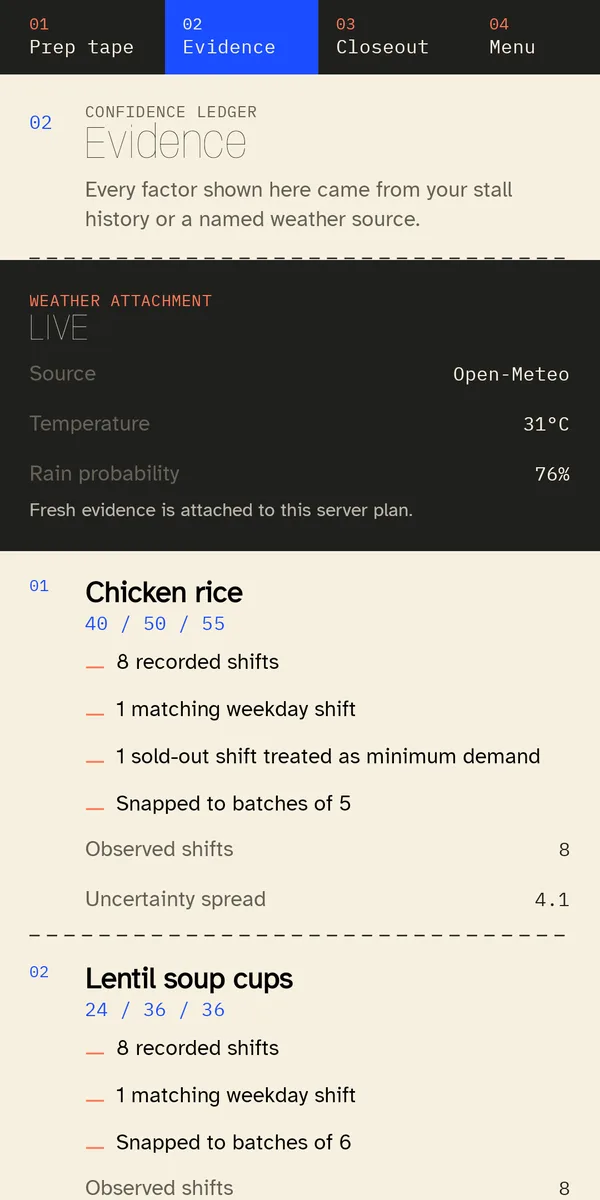
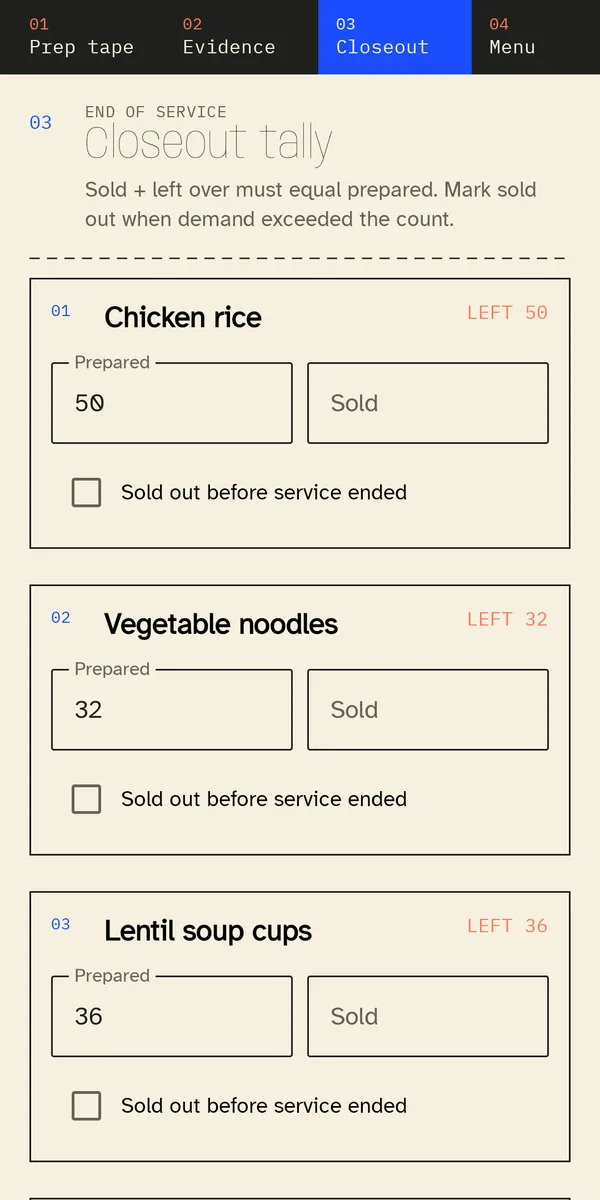
Other screens
The app also has a "History" screen of past closeouts, an optional daily prep alert, and an optional lock with fingerprint, face or a separate app PIN. Its data handling is described on the Skammtur data handling page.
What Skammtur does not do and what was not checked
- It gives an estimate and a range, not a promise about sales or leftovers.
- It needs an account and a connection to make a prep tape. If a closeout cannot be sent, the app says "Saved offline. Skammtur will retry when the connection returns."
- It is not a point-of-sale or inventory system, and it does not order stock.
- The pictures above use sample items, not a real stall's records.
- I have not checked how close its numbers come to what a real stall sells, or how much the weather changes them in practice.