 Saifullah Ahad
 QivraLive on Google Play
Concrete slump test form: what to write down
A concrete slump test form can be short. The Federal Highway Administration’s own data sheet for the test is one row, the word Slump and an empty box, and an Iowa State University summary lists four things to record for each test. This page goes through both, then shows what Qivra, an Android app for keeping a record of one slump test, adds around the reading, and where it stops, in plain words.
What slump is
“The difference between its original 12-in. height and its height immediately after the form is removed is the slump.”
Iowa State University, CP Tech Center
How it is written down
“The slump is measured and recorded to the nearest 5 mm [¼ in.].”
FHWA, Testing Fresh Concrete workbook
What it is not
“Slump is a process control test procedure and should not be considered as an acceptance criteria.”
Iowa State University, CP Tech Center
Concrete slump test report format: what the two sources say to record
Neither source gives a long form. Here is what each one says to write down, laid out as a sheet. The words in the left column are the sources’, not a standard.
Slump test sheet, as the sources describe it
Iowa State: “Measure and record the following for each test: Concrete temperature. Ambient temperature. Time. Slump.” For concrete from a central mix plant in nonagitating trucks, it describes a first test “5 minutes after the concrete batch is discharged from the mixing drum” and a second 20 minutes after.
On the same Iowa State list. Neither source gives a unit or a limit for it on this page, so I give none.
On the same Iowa State list.
FHWA: “Record to the nearest 5 mm [¼ in.].” Its measuring device is “Capable of measuring to the 5 mm [¼ in.] and at least 300 mm [12 in.] long.”
Iowa State ends its list with “Graph the test results.” and says graphing “will be helpful in monitoring material and process uniformity.”
What FHWA’s own “Data Sheet” for slump looks like, as I saw it on the page of the PDF: a table with one row, the word Slump on the left and an empty box on the right. The workbook also says: “The slump is generally specified in the project documents.” A project may ask for more fields than either source lists, so use the form your project gives you.
Concrete slump test results: what the number does and does not tell you
Both sources are careful about what one reading means. In their words:
What a result is
- FHWA: “This test is used to determine the consistency of concrete. In other words, how wet or dry the concrete is.”
- Iowa State: slump can be used “as an indicator of between-batch variability (uniformity).”
- Iowa State: “Changes in slump indicate variability in the materials and/or the batching process.”
What a result is not
- Iowa State: “The standard slump test should be considered as a pseudo-measure of workability.”
- Iowa State: a slump test “cannot identify which of these factors is changing”; it “simply measures the slump.”
- Iowa State warns against adding water to raise slump: “adding water above the approved mixture design content to overcome early stiffening is detrimental to shrinkage, permeability, and strength; thus, it should be avoided whenever possible.”
Iowa State also says results that “vary by more than 2 in. from sample to sample may indicate material and/or process control deficiencies.” I do not turn that into a pass or fail rule here, and neither does the app. Whether a result is acceptable is for the project documents and the people responsible for them.
How the slump itself is measured, in the FHWA workbook
The workbook’s procedure for the test it calls AASHTO T 119/ASTM C143. It is a training workbook, and it points to a separate practice for sampling: “Obtain the sample according to R 60 / C172.” The steps, nearly as it words them:
Dampen the mold, the base plate or other nonabsorbent surface, and the tamping rod.
Place the cone on the base plate or other nonabsorbent surface.
Fill the cone “in three equal layers by volume, rodding each layer 25 times.”
Strike off the top of the mold using the tamping rod and clean the excess concrete from the base of the mold.
“Lift the mold straight up taking care not to twist or angle the mold.” The workbook says the cone is lifted within 5 ± 2 seconds.
Invert the mold and place it near the slumped concrete “taking care not to disturb the slumped concrete.”
“Place the tamping rod on the inverted cone and measure from the bottom of the tamping rod to the displaced center of the slumped concrete.”
“Record to the nearest 5 mm [¼ in.].”
The workbook’s list of common errors
- “Pulling the slump up either too fast or too slow.”
- “Allowing the cone to move or wobble prior to the lift.”
- “Putting an object on top of the concrete in the mold prior to lifting the mold up.”
- “Using a nonabsorbent surface while performing this test.”
This is a summary of two free pages, not a replacement for the test standard or your project’s procedure. I did not read the standard itself.
An example sheet, with invented numbers
| Test | Time | Concrete temperature | Ambient temperature | Slump |
|---|---|---|---|---|
| 1, at 5 minutes | 10:05 | 21 C | 18 C | 75 mm |
| 2, at 20 minutes | 10:20 | 21 C | 18 C | 65 mm |
This is an example, not a real test and not from either source. It only shows the four fields Iowa State lists, for the two test times it describes, with the slump written to the nearest 5 mm as FHWA says. It makes no judgment about whether these numbers would be acceptable on any project.
What Qivra writes down
Qivra: Slump Test Records is an Android app that keeps a measurement sheet for one fresh-concrete slump test. It stores the slump as a range, and it can refuse to give a number. It does not decide whether concrete passes. Its own screen says so: “Qivra does not decide compliance. The project procedure and qualified human judgment remain authoritative.”
Starting a sheet
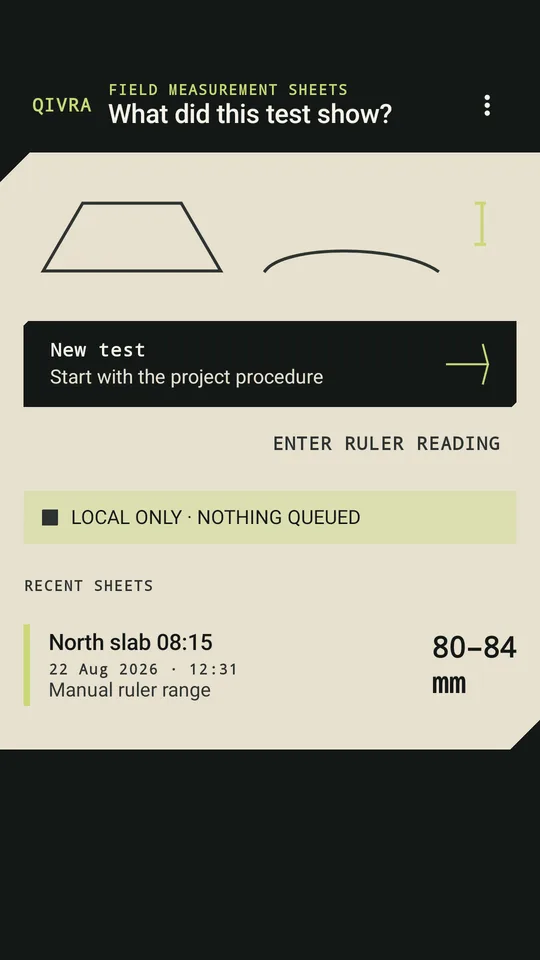
The home screen is headed FIELD MEASUREMENT SHEETS and asks “What did this test show?” New test says “Start with the project procedure”. The first step is a Procedure profile: “Enter the dimensions and label from the project procedure you are following.” You type a Profile name, a Procedure source label, the Cone height in millimeters and the Post-lift measurement point, and the app notes that “The project procedure is authoritative.” The app does not come with a standard built in; it holds the dimensions you enter. A Batch alias names the sheet, with the hint “Example: North slab 08:15”.
The sheet then moves through five steps, shown on a bar: PROFILE, SETUP, BEFORE, LIFT and RANGE. For the camera route, the setup screen says to stand only where the site’s responsible person says it is safe, not to hold the phone while the cone is lifted, and to stop if the test area becomes unsafe. Start 12-second capture saves a before frame; then “Lift the cone without touching the phone.” After the lift, you confirm the visible reference points on the Landmark bench, where “Suggestions are movable and never locked,” and press Calculate range.
The home screen: the New test button, the Enter ruler reading link, and one sample sheet, North slab 08:15, with a range of 80 to 84 mm.
A range, not one number
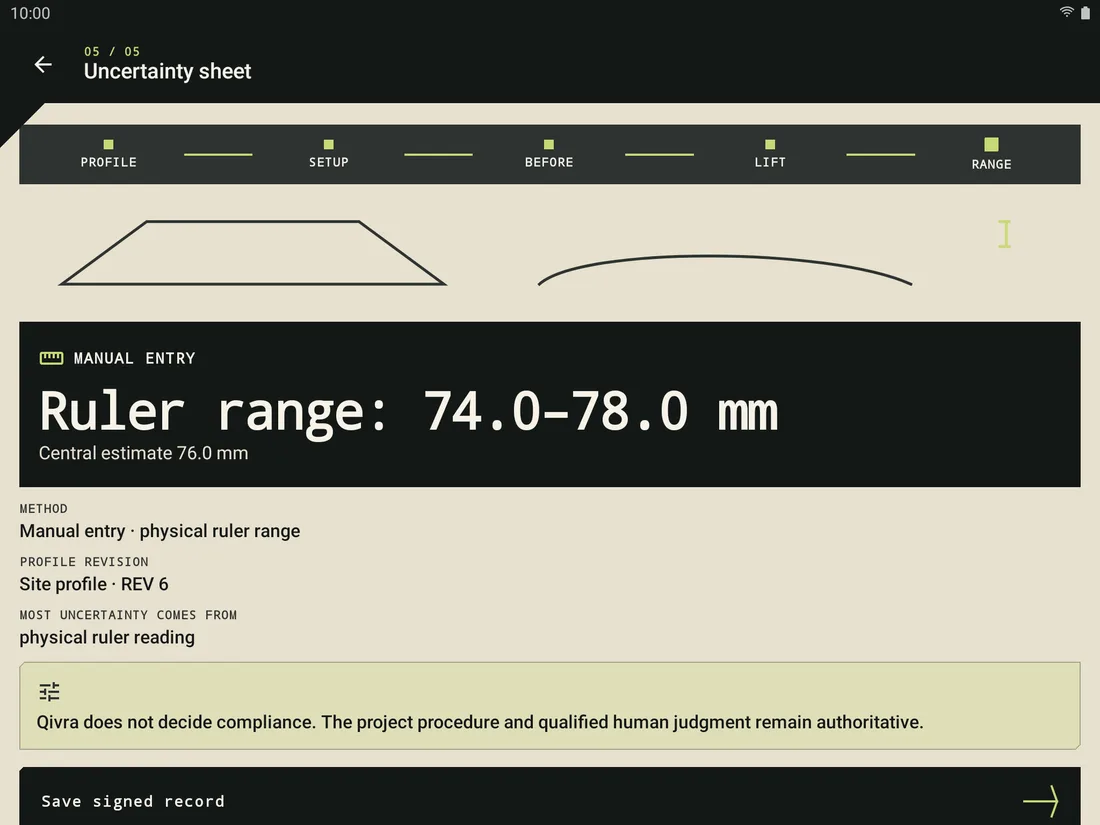
The Uncertainty sheet shows Estimated range for the camera route or Manual entry for the ruler route, with lines such as “Measured drop: x–y mm” or “Ruler range: x–y mm”, a Central estimate, the METHOD, the PROFILE REVISION and MOST UNCERTAINTY COMES FROM. Under it sits the no-compliance line. Save signed record keeps it.
A manual sheet on a tablet: Ruler range 74.0–78.0 mm, Central estimate 76.0 mm, and the line that the app does not decide compliance.
The saved sheet
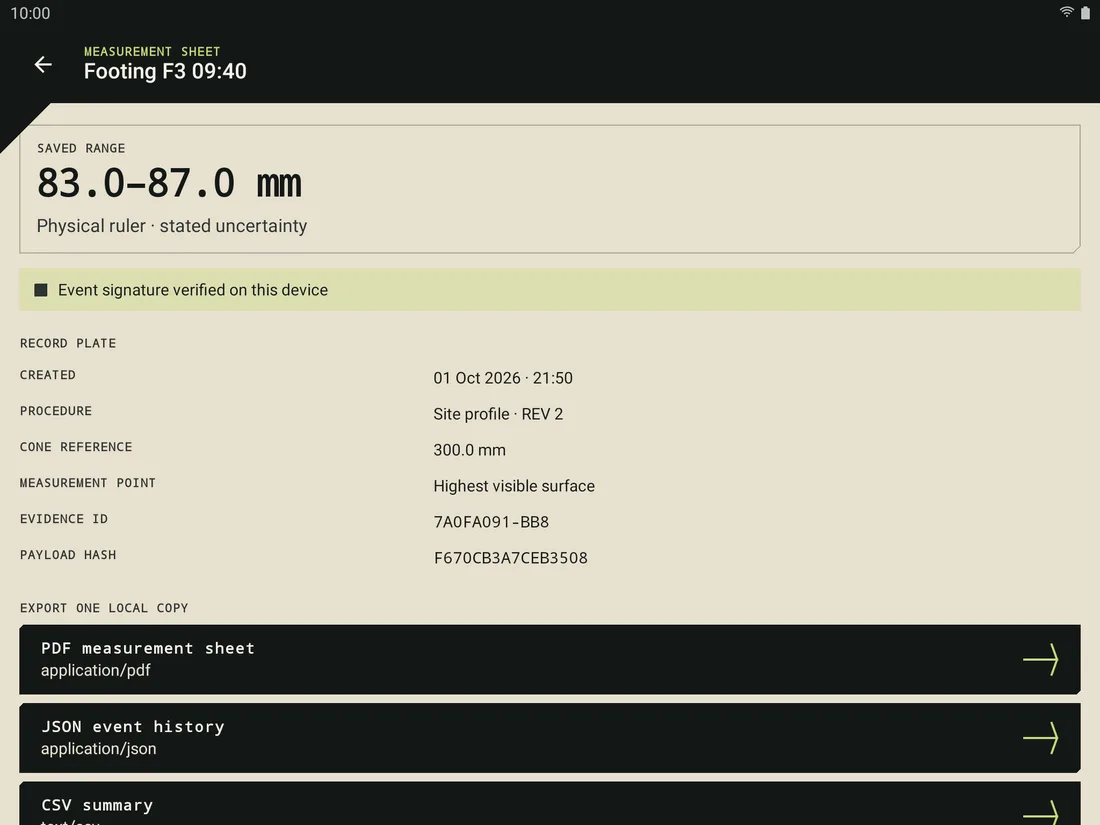
A saved Measurement sheet shows the SAVED RANGE and a RECORD PLATE with CREATED, PROCEDURE, CONE REFERENCE, MEASUREMENT POINT, EVIDENCE ID and PAYLOAD HASH. The store text says the signature is held by the app and helps detect later changes to the file. The privacy policy adds that these controls “do not prove that a physical scene happened as described.”
A saved sheet, Footing F3 09:40, on a tablet: a saved range of 83.0–87.0 mm, the record plate and the first export buttons. The sheet name and numbers are sample entries in the store picture.
Ruler reading, refusal, and exports
Qivra is not only a camera tool. Enter ruler reading opens Physical ruler reading: “Enter the reading and the smallest interval you can defend from the ruler. The saved output remains a range.” You fill in Ruler reading and Reading uncertainty, ± mm, and can attach an optional ruler photo. Compare that with FHWA, which asks for the slump “to the nearest 5 mm [¼ in.]”: the app keeps the reading and the uncertainty you state as a range, so it records more than the one-row sheet does. Which of the two your project accepts is for the project procedure; I did not check that.
When the camera evidence is not good enough, the app is built to give no number. The result screen says Cannot measure reliably and the saved sheet says No defensible range, with the method written as “Intentional refusal · no number produced”. It lists reasons in plain sentences, such as:
- “The phone moved between the two frames”
- “The full cone reference is not visible”
- “Lighting or glare hides needed evidence”
- “One or both evidence frames are blurred”
- “The procedure-defined point is unclear”
A saved sheet can be exported as a PDF measurement sheet, a JSON event history, a CSV summary or a .qivra verification bundle. Each one is written only after you choose where to save it. Verify .qivra file checks a bundle’s structure, hashes, event signature, parents and signer key, and says: “This check does not prove that the photographed physical test happened as described.”
Where it stops
- The app’s own line: “Camera ranges are not yet checked against real site tests. When the result matters, take a ruler reading too.”
- It does not decide compliance, certify concrete, predict strength or authorize placement. The store text says it does not replace project specifications, licensed test standards, laboratory testing, site procedures or qualified human judgment.
- The Measurement boundary screen: “Qivra estimates visible vertical geometry. It does not reproduce a complete test standard, identify a batch, evaluate site safety, predict strength, or authorize placement.”
- It does not set slump limits or tell you what a good slump is. That is the project’s to say, as the FHWA workbook notes.
What it keeps, and where
The privacy policy says the app has no account and no developer server, and that “We do not collect, receive, sell, rent, or share personal data through Qivra.” On the phone it keeps your batch aliases and procedure labels, the ranges or refusal reasons, the confirmed landmarks, hashes and signatures, and two camera frames when the camera route is used. Record payloads are encrypted with a key held by Android. Camera frames become eligible for cleanup after 24 hours; saved sheets stay until you delete one, delete all local data, clear the app’s storage or uninstall.
The app asks for the camera and, per its manifest, removes the internet permission. An export is a separate copy outside the app, and the policy says the app cannot delete it from another app, device or recipient.
What I did not check
I read the store listing, the project records, the app’s screen text, the manifest, the privacy policy, and I opened the store pictures. I did not run the app and I did not read the code that computes the camera range. The project’s own release notes of its checks describe software checks on phones; they also say no fresh concrete, slump cone or independent ruler comparison was available, so how close a camera range comes to a real slump is not known from the records, and this page gives no such number. I did not check any state transportation department form, and I did not read the test standard.
Get it
An Android app on Google Play, for keeping a sheet of one slump test as a range.
View Qivra on Google PlayWhere the guide comes from
Iowa State University, CP Tech Center
“Concrete Property Test, Workability 1-3: Concrete Slump”, a two-page summary dated April 2008. Read in full. It says it comes from the Testing Guide for Implementing Concrete Paving Quality Control Procedures (Fick, 2008), a product of a 17-state Federal Highway Administration pooled-fund project, and that its opinions are the authors’.
Federal Highway Administration
“Module G, Testing Fresh Concrete, Laboratory Manual, Participant Workbook”, part of the Highway Materials Engineering Course. The document shows no date; the file’s properties show July 2017. I read the slump section in full, not the other tests in it.
fhwa.dot.gov: Testing Fresh Concrete laboratory manual (PDF)
Building a field record tool?
Qivra is one of the apps I built on my own. If you need a record-keeping app made for your own kind of test, write to me.