 Saifullah Ahad
 NatisnitiLive on Google Play
Print from Android phone to USB printer: what the sources say
To print from Android phone to USB printer, you need a phone that can act as the USB host, an adapter, and something on the phone that speaks to that printer in a language it understands. Two nonprofit sources cover the first and last parts. Then comes Natisniti, an Android app for this job, with the printers it supports, the ones it does not, and the fact that no printer has been tried with it yet.
Mopria Alliance says
Its Android print service relies on wireless links. USB and USB-OTG are not directly supported.
USB-IF says
A device that acts as a USB host is not expected to support the full range of USB peripherals.
Natisniti, honestly
Sends PDF pages to USB printers that speak PCL 5e or PostScript Level 2 in black and white. No printer model has been tested on paper.
Can I print from my Android phone via USB?
Neither source below is about one printer brand, and neither is a company that sells a print app. Here is what each says, in its own words.
The usual Android route is wireless
Mopria Alliance, “Print From Android”. A nonprofit membership group for print and scan standards. Its members are printer and device companies.
How printing from an app works
“Open the app you want to print from and look for a print option, button or icon.” “This print function is often found under the apps or share menu.”
What it needs
“A wireless network connected to both the Android device and the printer, MFP or print accessory. If both the Android device and the printer, MFP or print accessory support Wi-Fi Direct, no wireless network is needed.”
Can I use USB or USB-OTG (On-The-Go) with Mopria Print Service?
“No, Mopria Print Service primarily relies on wireless connections such as Wi-Fi Direct or local networks. USB and USB-OTG connections are not directly supported.”
mopria.org/print-from-android, read in full on 2026-11-13. The page shows no date.
A phone as USB host is not a computer
USB Implementers Forum, “On-The-Go and Embedded Host Supplement to the USB Revision 3.0 Specification”, Revision 1.1, May 10, 2012. USB-IF calls itself “a non-profit corporation founded by the group of companies that developed the Universal Serial Bus specification.”
Why a phone or other small device can be a host
“Today many devices that are not PCs in the classic sense have a need to connect directly to peripherals: Printers connect directly with cameras, for example, or mobile phones may need to connect to USB headsets.”
What it does not promise
“Although they will provide host capability for some devices, it’s unreasonable to require them to support the full range of USB peripherals.”
What it calls such a host
“A Targeted Host is a USB host that supports a specific, targeted set of peripherals.”
usb.org: On-The-Go and Embedded Host Supplement (PDF), introduction read on 2026-11-13. It is a 2012 document about USB 3.0. It says nothing about any particular Android phone, and I do not claim it does.
How to print from Android to a USB printer: four questions
The sources do not give a step list, so this part is my reading of them, not theirs. It is a way to find out where a cable setup will stop before you spend time on it.
Can the phone act as the USB host?
Not every phone does, and USB-IF says a host need not support every kind of peripheral. A phone that can host some USB devices may still not work with a printer.
Does the cable and adapter fit?
The printer end of the cable is not the same shape as the phone’s port, so an adapter or an OTG cable sits in between. Natisniti’s store text asks for a standard USB OTG cable or adapter.
Which route carries the page?
Mopria says its Android print service is wireless and does not directly support USB. So a cable needs a print service that does talk USB, and you turn it on in the phone’s print settings.
Does the printer understand what is sent?
A printer only prints a page it can read. The next part lists the two languages Natisniti sends and the many it does not.
What Natisniti does
Natisniti: USB Printing is an Android app that sends PDF pages from your phone to a USB printer through a cable and adapter. It registers itself as a print service in Android’s print settings and also takes a PDF shared from another app. It needs no computer and no cloud print service. Its own screen says what it will not do, and the pictures show that.
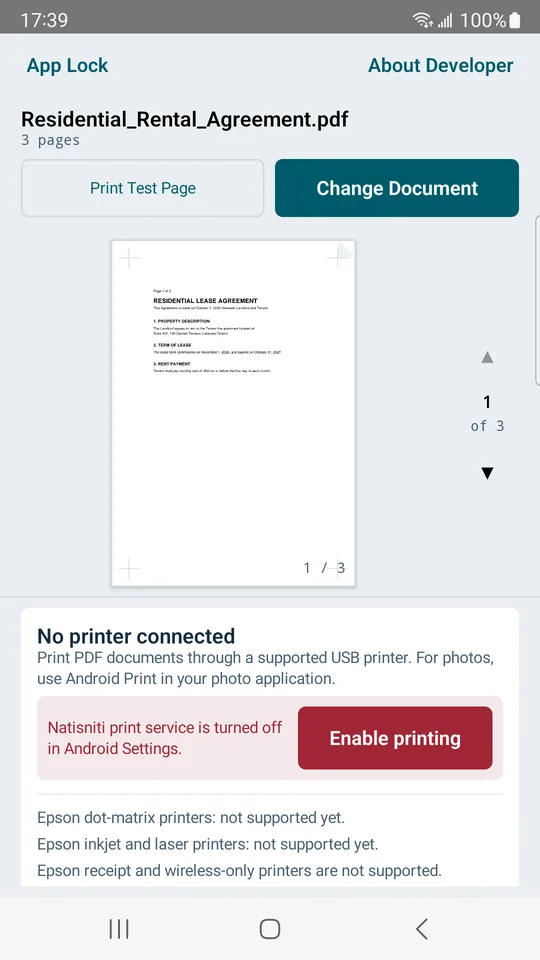
The main screen
Change Document picks the PDF. The preview shows one page with its number, here page 1 of 3. Print Test Page sends a built-in page first. The box below says No printer connected. Its red part, Enable printing, says “Natisniti print service is turned off in Android Settings.”
The store picture: a sample PDF, with the Epson lines at the bottom of the screen. The sample document’s text is too small to read at this size.
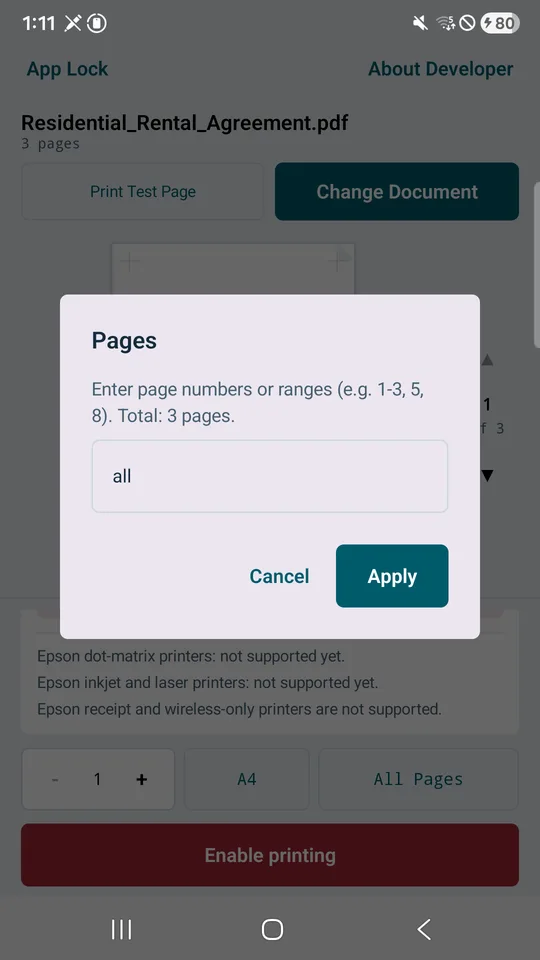
Choosing pages
The Pages dialog says: “Enter page numbers or ranges (e.g. 1-3, 5, 8). Total: 3 pages.” The entry starts as “all”. Beside it the main screen has a copies counter and the paper size: A4, Letter or Legal.
The Pages dialog over the sample PDF, with Cancel and Apply.
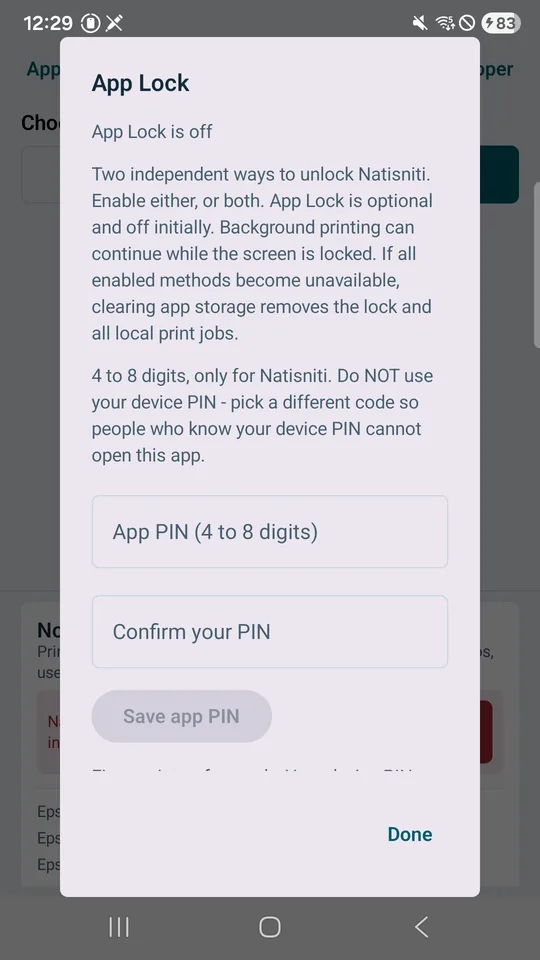
A lock for the previews
App Lock is optional and off at first. You can set a separate 4 to 8 digit PIN, use fingerprint or face, or both. The app says: “Background printing can continue while this screen is locked.”
The App Lock dialog with its PIN boxes and Save app PIN.
Which printers it can and cannot send to
What it sends
- HP PCL 5e, monochrome. Black and white at 300 or 600 DPI.
- Adobe PostScript Level 2, monochrome. Black and white at 300 or 600 DPI.
- Paper sizes A4, Letter and Legal, portrait or landscape.
- The USB device must report itself as a printer (USB class 7) with a bulk output channel.
- Input is a PDF. The app says: “For photos, use Android Print in your photo application.”
What it does not
- Epson. The screen says: “Epson dot-matrix printers: not supported yet.” “Epson inkjet and laser printers: not supported yet.” “Epson receipt and wireless-only printers are not supported.” Epson’s ESC/P and ESC/P 2 are switched off until a full page can be checked.
- Printers that need firmware sent to them first. The store text names the HP LaserJet 1000, 1005, 1018 and 1020.
- Canon CAPT, ZjStream, PCL 5c color, PCL XL (PCL 6), and receipt or label languages such as ESC/POS, ZPL, TSPL and CPCL.
- Any color output.
- A printer that does not report PCL 5e or PostScript Level 2: “This printer does not report PCL 5e or PostScript Level 2 support.”
Which printers were tested: none
The records say it plainly: every printer model is marked not yet confirmed, and a check on real printers is left for later. No printer was attached during the build. I cannot tell you that any printer, brand or model works with Natisniti, and nothing on this page should be read as saying so.
What was checked is the print data itself. Two computer programs that read PCL and PostScript output read back what the app produces, and the records say that proves the output language only. The records add that it “does not confirm a physical printer model, USB hardware electrical characteristics, or paper output.” The app itself shows not yet confirmed next to a connected printer and says: “Start with the test page.” After sending it says: “Sent to printer. Check the paper.” It does not claim it saw a sheet come out.
If the cable comes out
- The app does not send the same pages again on its own. It says: “Printing may have stopped partway. Check the paper before trying again.”
- On cancel: “Cancelled. The printer may finish pages already received.”
- If the phone has no USB host: “USB printing is not available on this device”. If the device is not a printer: “This USB device is not a printer”.
What it keeps, and where
While a job is pending, the page data and the document name are held in encrypted storage inside the app. Finished, cancelled and failed jobs are cleaned up; the policy says the cleanup runs when the app starts and about every 30 seconds while it runs, and that unresolved jobs expire after 24 hours at the next pass. Short status and timing records can remain a while longer. Your original PDF is not changed, and the app cannot erase a copy a printer holds.
The privacy policy says the app sends no personal data to the developer or to any cloud server. The app asks for the print service and optional fingerprint permissions, and the manifest removes internet, network-state and storage permissions. The policy also speaks of “photos”; the app screen and store text say PDF only, so I describe it as PDF only.
What I did not check
I read the store listing, the build records, the compatibility notes, the app’s text and manifest, and the privacy policy, and I opened the store pictures. I did not run the app and I ran none of its tests. I did not connect any printer, so I cannot say how the test page looks on paper, whether a phone’s USB host mode accepts a given printer, or how quickly a page prints. Which phones can act as a USB host is not something the two sources tell me, so this page does not list any.
Get it
An Android app on Google Play. It prints PDF pages to the USB printers described above, and it is clear that it has not been tried on one yet.
View Natisniti on Google PlayWhere the guide comes from
Mopria Alliance
“Print From Android”, mopria.org. A nonprofit membership group made of printer and device companies; its own FAQ calls it a Delaware non-profit membership corporation. Read in full. Its printer counts and member claims are not used here.
USB Implementers Forum
“On-The-Go and Embedded Host Supplement to the USB Revision 3.0 Specification”, Revision 1.1, May 10, 2012. Introduction and definitions read; the technical state tables were not.
Have a USB printer and an Android phone?
Start with the four questions above. If you try Natisniti, print its test page first and check the paper yourself.