 Saifullah Ahad
All twenty-eight build stories
 Energy LoomLive on Google Play
Energy Loom: how to calculate battery backup time, step by step
A power cut is easier to face when you know how long a battery can run the things you need. A university extension fact sheet and a national laboratory guide give the pieces. You can follow them with a pencil and the labels on your devices, no app needed.
- The arithmetic in four lines
- Watts × hours a day = watt-hours a dayStep 1 and 2
- Volts × amp-hours = battery watt-hoursStep 3
- Battery watt-hours × usable share = usable watt-hoursStep 4
- Usable watt-hours ÷ watt-hours a day = days it lastsStep 5
Five steps to a battery backup time
This is a planning method, not an electrical design. The two sources are general information, and neither is advice for one particular home. The last step turns a sizing rule around, and I say where.
Find the watts of each device
The Virginia Cooperative Extension fact sheet from Virginia Tech says to look for the wattage “stamped on the bottom or back of the appliance, or on its nameplate.” It adds that “The wattage listed is the power drawn by the appliance”, and that because many appliances have a range of settings, the actual power drawn depends on the setting used at any one time.
If no wattage is listed, the fact sheet says to find the current in amperes and multiply it by the voltage the appliance uses. Most appliances in the United States use 120 volts. The Pacific Northwest National Laboratory guide starts its sizing the same way: take an inventory of all the electricity loads and list each one’s power in watts.
Multiply by the hours each device runs, then add them up
Virginia Cooperative Extension gives the formula as wattage times hours used per day, divided by 1000, which gives daily kilowatt-hours (“1 kilowatt (kW) = 1,000 Watts”). The national laboratory guide skips the kilowatt step and multiplies the power by the average time in use “to get the average daily load, in watt-hours.” Add the loads together for one daily total.
A refrigerator needs care. The fact sheet says refrigerators “cycle on and off as needed to maintain interior temperatures”, and that to estimate the hours a refrigerator actually runs at its maximum wattage you divide the total time it is plugged in by three.
Volts times amp-hours
The national laboratory guide says the total energy of a battery, in watt-hours, “can be found by multiplying the voltage of a battery by the battery’s capacity”, and the capacity is measured in amp-hours. It also separates energy from power: energy is watt-hours, and power is how quickly energy is delivered, in watts.
Example: a 12 volt battery labeled 100 amp-hours holds 12 × 100 = 1,200 watt-hours. (The numbers are an example, not a product.)
Depth of discharge, and what an inverter takes
The national laboratory guide explains that depth of discharge is how much of the battery has been used, state of charge is how much is left, and “The SoC and the DoD will always add up to 100 percent.” It says the allowable depth of discharge “will be listed on the manufacturer’s spec sheet.” Its comparison table lists a depth of discharge of about 85% for lithium-ion and about 50% for lead-acid. Use the figure for your own battery, not these two.
The same guide says batteries are sized on the daily load, the efficiency of the inverter and the DC system voltage. It gives no number for inverter efficiency, and neither does this page. If your devices run through an inverter, some energy is lost there, and the example below uses a number for it only to show the step.
Usable energy divided by the daily total
The national laboratory guide states its rule for sizing a battery: multiply the daily average load by the outage length in days, then divide by the allowed depth of discharge. Its example is 2.293 kWh a day for 3 days at 0.7, which gives 9.8 kWh. Turning the rule around is my step, not the guide’s: usable watt-hours divided by the daily watt-hours gives the days the battery can carry that load. Multiply by 24 for hours, if the energy is spread evenly through the day.
Here is a worked example. Every number is an example, taken from the starting plan inside the Energy Loom app, and none of it promises how long a real battery will last.
| Load (example) | Watts | Hours a day | Watt-hours a day |
|---|---|---|---|
| LED lights | 36 | 6 | 216 |
| Phone charging | 20 | 3 | 60 |
| Internet router | 12 | 8 | 96 |
| Table fan | 45 | 5 | 225 |
| Daily total | 597 |
Example battery: 1,200 watt-hours. Usable share 80%: 1,200 × 0.80 = 960 watt-hours. Example inverter loss, kept at 88% to show the step: 960 × 0.88 = 844.8 watt-hours. Then 844.8 ÷ 597 = about 1.4 days, or about 34 hours if the day’s energy is spread evenly. Leave out the inverter step and the same sums say about 1.6 days, which shows why the step matters.
Two safety points from the sources
- Motors draw more when they start. Virginia Cooperative Extension says that when measuring a motor, the meter “will show about three times more current in starting the motor than when it is running smoothly.”
- The national laboratory guide says inverters are rated by surge watts, and that “The estimated surge watts are typically three times the peak.”
Both sources carry a disclaimer. The extension fact sheet says it is not a substitute for professional advice and is not for guidance on a specific design or construction project. The laboratory report says it makes no warranty about accuracy or usefulness. For wiring, fuses and a real purchase, ask a qualified installer.
Virginia Cooperative Extension
“Energy Series: Estimating Appliance and Home Electronic Energy Use”, Virginia Tech, 2020. Used for steps 1 and 2 and the motor point.
Pacific Northwest National Laboratory
“An Introductory Guide to Generating, Using, and Storing Energy”, report PNNL-33984, April 2023, for the U.S. Department of Energy. I read its chapters on battery capacity and on sizing, not the whole report. Used for steps 1 to 5 and the surge point.
Energy Loom does these sums for you, and shows them per device.
Energy Loom is an Android app for planning household backup power. You type in your devices and your battery, and it works out the daily energy, the usable battery energy and how long the battery reaches. It never reads your battery or your house; it only does arithmetic on what you enter.
These three pictures come from the app’s store gallery. Every name and number in them is the app’s own example plan.
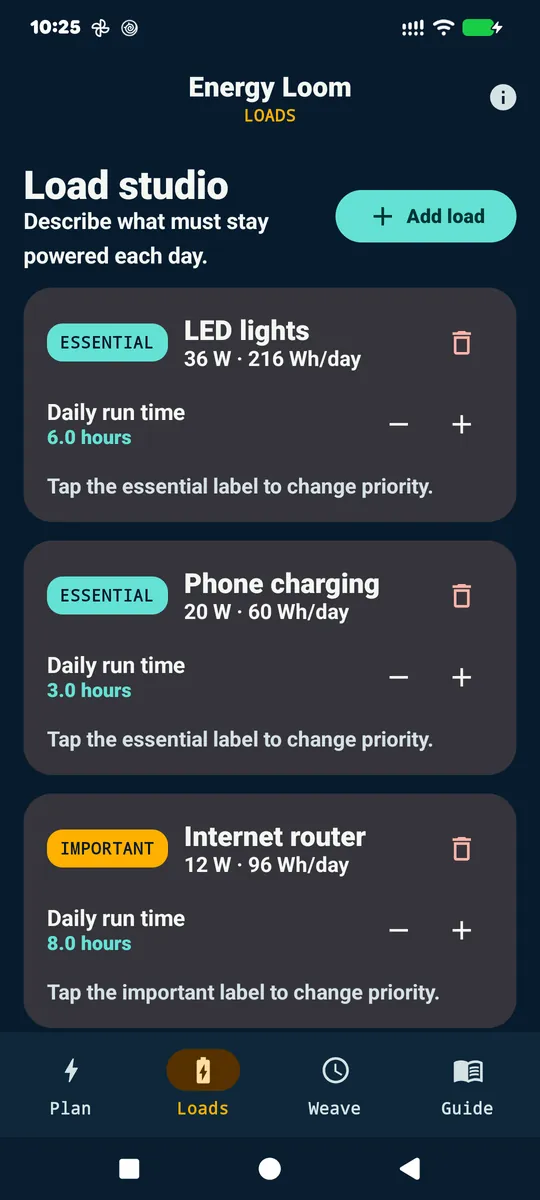
Loads: steps 1 and 2
On the Loads tab, Load studio says “Describe what must stay powered each day.” Choose Add load and enter a Device name, the Watts and the Hours/day, or start from a common device. Each load is marked Essential, Important or Flexible, and the card shows its watt-hours a day.
The Loads tab of the example plan: LED lights at 36 W, Phone charging at 20 W and Internet router at 12 W, with 216, 60 and 96 Wh/day and their daily run times.
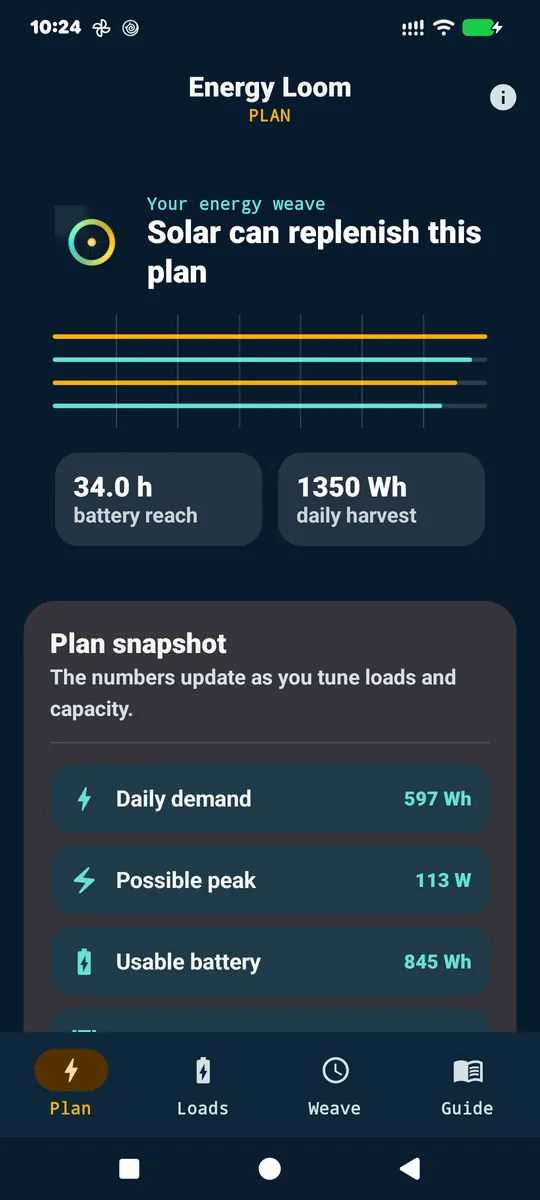
Plan: steps 3 to 5
Under System assumptions you set Battery capacity in watt-hours, Usable depth and Inverter efficiency. There is no amp-hour or volt box, so do step 3 first. The Plan tab then shows Daily demand, Usable battery, Possible peak (every load’s watts added together) and the battery reach in hours. It divides the usable energy by the daily total over 24 hours, the same even spread as the worked example above, and it stops showing at 99 hours.
The Plan tab of the example plan: 34.0 h battery reach, with Daily demand 597 Wh and Usable battery 845 Wh. These match the sums above. The screen also shows a solar figure, which this page does not cover.
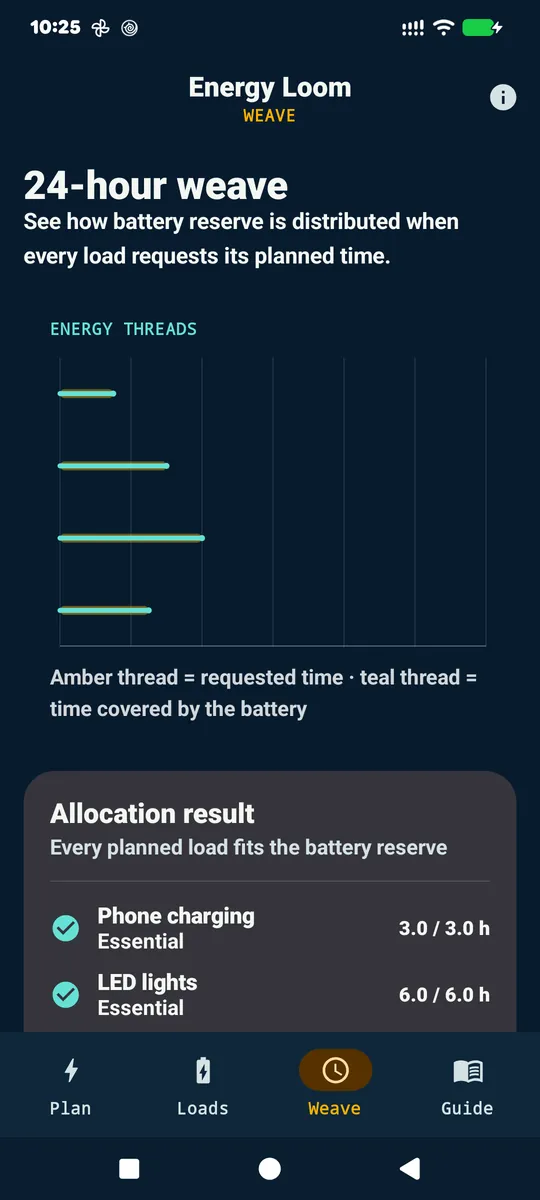
Weave: which devices get the battery first
The Weave tab hands the battery to the loads in priority order: Essential first, then Important, then Flexible, and lower watts first inside each group. Allocation result shows the hours each load is covered against the hours it asked for, and says when every planned load fits the battery reserve. This tab is the app’s own addition, not a step from either source.
The Weave tab of the example plan: four energy threads, with the screen’s own line saying amber is requested time and teal is time covered by the battery, and Phone charging 3.0 / 3.0 h and LED lights 6.0 / 6.0 h in the Allocation result.
What it keeps, and where
The loads and battery numbers you enter stay in the app’s private storage on your phone, and its privacy policy says they are not uploaded to the developer. Feedback is the one thing that leaves the phone: only when you tap Send, the message, an email address if you give one, and the app version, Android version and device make and model go through Web3Forms to the developer’s inbox. The policy says the app has no account, analytics, advertising or location access. Read the privacy policy.
Where it stops, and what I did not check
The app calls itself an early planning aid, not an electrical design or installation tool. It does not size wiring, fuses, breakers or chargers. Its runtime figure uses running watts, so motor start-up current is not in it, and it has no model of battery type, temperature or age. Its Guide says surge power matters, and a notice on its screens tells you to ask a qualified installer to verify the wiring and protection.
For this story I read the store listing, the privacy policy, the code, the test file and the test notes, and looked at the store pictures. I did not run the app or its tests, and I did not compare its answer with a real battery. The test notes list a run on a phone, which I did not repeat.
View Energy Loom on Google PlayKnow someone who plans for power cuts?
Tell me who it is and what they have to keep running.