 Saifullah Ahad
 CircuitDocketLive on Google Play
CircuitDocket: how to label breaker panel circuits, from named safety sources
How to label breaker panel circuits, according to three named sources: say what each breaker serves, outlet by outlet, and leave the inside of the panel to a qualified electrician. CircuitDocket, an Android app that keeps your own record of a panel, comes after the guide. It labels nothing on the wall and it never opens, tests or switches anything.
A sample entry, as ESFI writes it
| Circuit | “Circuit #3” |
|---|---|
| Room | “Kitchen” |
| Rating | “20 amps” |
| What it serves | “Serves three receptacles along the north and west walls of the kitchen, the kitchen ceiling lighting fixture (120 watts), and light fixture over the sink (60 watts).” |
From the circuit map section of “Indoor Electrical Safety Check”, Electrical Safety Foundation International, a 2004 booklet. ESFI writes the first three parts on one line, joined by double hyphens, then lists what the circuit serves.
Read this before anything else
Whether you say breaker box or panel, how to label breaker box circuits is a question about writing things down, not about working inside the enclosure. The U.S. Consumer Product Safety Commission says: “DO NOT remove the service-panel cover” and “This is a job for a qualified electrician.” It also says a safety inspection “should be performed by a qualified electrician or licensed electrical inspector.” ESFI says you cannot perform your own electrical inspection unless you are “a qualified, licensed electrician or electrical inspector.”
If you are unsure about anything in a panel, call a licensed electrician. If you see smoke, arcing, burning, exposed conductors, heat, or water near electrical equipment, the CircuitDocket safety screen says to move away and contact local emergency or utility services. This page does not tell you to open a panel or to work on any wiring.
How to label breaker panel circuits: what three sources say
None of the three is a company that sells a labeling product or an app. Each is quoted as it says it, from the page or booklet I read in full for the part used here.
University
UC San Diego
“Electrical panels house the circuit breakers that control each electrical outlet. Make sure power can be shut off quickly in case of emergency by doing the following” and, in its list, “Label each circuit breaker, identifying the outlet it controls.”
The point: each breaker gets a label that names the outlet it controls, so power can be shut off quickly in an emergency.
Nonprofit
ESFI
“A good circuit map goes beyond what the sticker on the inside of the electrical panel door provides. It details every receptacle and fixture each circuit serves.”
It describes making one as “a simple, though admittedly time-consuming process of shutting off a single circuit at a time and determining which outlets and lighting fixtures have been affected each time,” and says “note what appliances are plugged in at each receptacle.”
The point: a door sticker is a start. The fuller record lists every outlet and fixture a circuit serves. The booklet is from 2004, so check anything you act on against current local rules.
Government
CPSC
“DO NOT remove the service-panel cover” and “This is a job for a qualified electrician.”
It also says an inspection “should be performed by a qualified electrician or licensed electrical inspector.”
The point: the record is written from the outside. The cover stays on.
ESFI’s description of switching one circuit off at a time is its own, in its own words. I am not adding steps to it. The CircuitDocket walkdown screen says: “Use only accessible breaker handles when permitted. Never remove a panel cover or touch conductors. Work with a helper when rooms are out of sight.” Follow local rules and property procedures, and ask a licensed electrician if you are not sure.
How to label electrical panel entries: name what each circuit serves
Taken together, the three sources point at the same habit. UC San Diego asks that each breaker be labeled with the outlet it controls. ESFI asks for more than the door sticker: every receptacle and fixture, and the appliances plugged in. CPSC and ESFI both name a qualified electrician for the inspection, and CPSC names one for the panel cover.
None of the three gives a label format, label material or printing method, and none says what an electrical code requires of a directory, so this page does not either. A local building department or a licensed electrician is the place to ask about your own rules.
An example, made up for this page
The fields CircuitDocket asks for one breaker, filled in by hand:
- Circuit label
- Kitchen counter
- Room or area
- Kitchen
- Breaker amps
- 20
- Pole count
- 1
- Circuit volts
- 120
- Circuit notes
- Shares the wall with the pantry
Not a real home and not a recommendation for any rating. The app takes whatever values you read from your own labels.
What CircuitDocket keeps
CircuitDocket: Panel Map is an Android app for writing down a panel: which breaker is in which slot, what you call it, which room, which devices. It does not see, test or switch any breaker. Its own README says: “CircuitDocket does not sense breakers automatically or connect to smart-panel hardware.” Everything in it is typed by you.
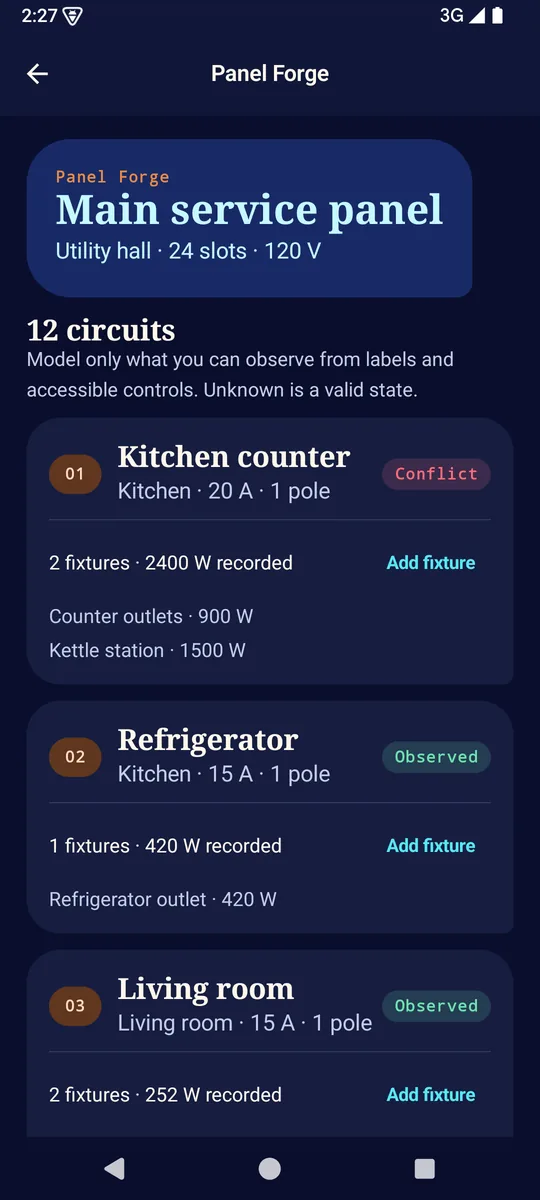
Panel Forge
The panel screen with sample records: a panel named Main service panel in a Utility hall, and breaker cards with a slot number, a label, a room, amps and a state.
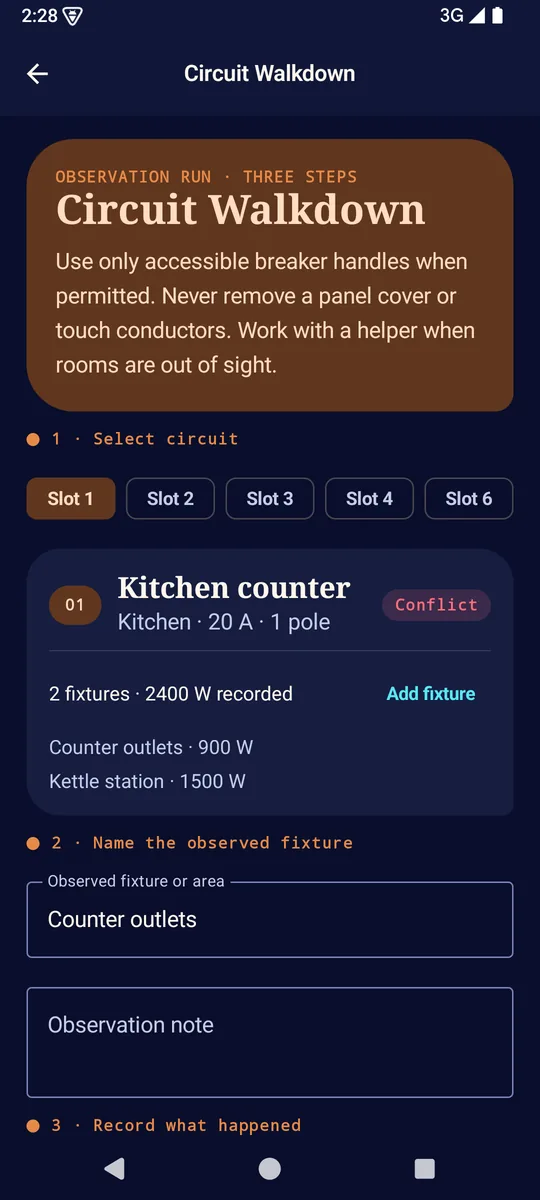
Circuit Walkdown
Step 1 picks a circuit, step 2 names the fixture or area, step 3 records what happened. The warning about panel covers and conductors sits at the top of the screen.
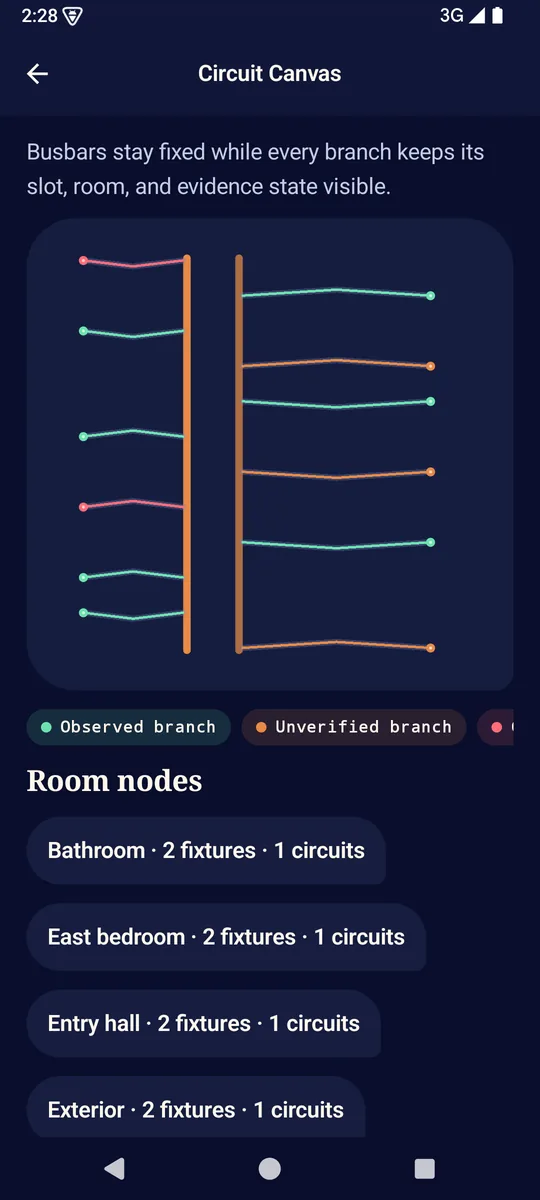
Circuit Canvas
The saved records drawn as busbars with a branch for each circuit, and the rooms listed below it as room nodes.
The label side, in the app’s words
In Panel Forge you add a panel with a name, a location, a slot count and an electrical service (Split-phase 120/240 V, Single-phase 230 V, Three-phase 230/400 V or Custom). Each breaker gets a Circuit label, Room or area, Breaker amps, Pole count, Circuit volts and Circuit notes, and the devices on it go under Fixture or device, with an optional Nameplate watts. The app says: “Model only what you can observe from labels and accessible controls. Unknown is a valid state.” More than one panel can be kept.
Finding a breaker later
Circuit Lookup says: “Search by room, circuit label, device, fixture, panel, or note.” It matches the text you typed against what you saved. It is a search of your own record, so it is only as good as the labels in it.
Recording what you saw
In Circuit Walkdown you choose Lost power, Still on or Not sure, with an optional note. The circuit then shows Observed, Conflict or Unverified. In the code, Lost power sets Observed, Still on sets Conflict and Not sure sets Unverified. The app also says: “A label, room note, load estimate, or observed power loss is not proof that a circuit is de-energized.”
Taking the record out
Export panel legend PDF creates “a printable panel directory with recorded loads.” The PDF carries the line: “User-recorded observations only. Follow local rules and use a qualified electrician for electrical work.” Export circuit CSV makes a spreadsheet-ready record, and Import worksheet reads a CircuitDocket worksheet you choose. Files go only through Android’s document picker, and the app asks for no broad storage access.
Where it stops
- It does not label your panel. It makes a record, and a PDF you can print and use as you choose. How you put a label on the real panel is up to you and your electrician.
- Its safety screen says: “Document observations. Do not perform electrical work through this app.” and “Use a qualified electrician for inspection, repair, modification, or verification before work.”
- Load Audit says: “Nameplate totals are planning evidence, not a code calculation. Actual demand, conductor size, protection, and local rules require qualified review.”
- A recorded loss of power never proves a circuit is de-energized. The README says so too.
- It does not read your panel, connect to smart-panel hardware, or tell you whether your wiring is safe or meets code.
What it stores, and where
Your properties, panels, circuits, devices and observations are kept in the app’s private storage on the phone. The privacy policy says the app “does not collect, receive, sell, rent, or share personal information or app records,” and that records stay until you clear the workspace, clear the app’s storage in Android Settings, or uninstall it. Files you export stay where you saved them. An optional backup is encrypted with a password you choose, and the app cannot recover a forgotten one.
The app’s own manifest removes the internet, network-state and advertising ID permissions and declares no other permission.
What I did not check
I read the store listing, the project records, the app’s text and code, and the privacy policy, and I opened the store pictures. I did not run the app and I ran none of its tests. A project record says the signed release build was tried on an Android emulator, and lists unit tests for the encrypted backup and the load numbers that passed; I did not repeat any of it, and I did not inspect the merged manifest of the release file. I have not checked how it behaves with a large panel, or on any particular phone. I read three outside sources for the parts used above, not everything they say, and none is a legal or code reference.
Get it
An Android app on Google Play. It keeps a written record of a panel, and nothing else.
View CircuitDocket on Google PlayUC San Diego, Blink
“Electrical Safety Guidelines”, last updated January 13, 2026. Read in full. It is guidance for UC San Diego workplaces; only the label line and the reason for it are used.
Electrical Safety Foundation International
“Indoor Electrical Safety Check”, a 2004 booklet; the section “Circuit map and power audit” was read in full. Its wattage examples and 80 percent rule are not used. ESFI describes itself as a nonprofit.
U.S. Consumer Product Safety Commission
“CPSC Guide to Home Wiring Hazards”, an older booklet with no date printed in it. Page 3 was read as a picture, because the file’s text layer is garbled. The scan prints without most punctuation marks, so any comma or period inside the CPSC quotes above is mine; the words are its own.
Have a panel with no labels?
Start by asking a licensed electrician what is safe for you to do yourself. The record is the easy part.