 Saifullah Ahad
 AynPauseLive on Google Play
AynPause: the 20-20-20 rule and screen break habits
Two health sources give the idea behind a 20-20-20 break and other habits for long screen sessions. You can follow all of them without an app. AynPause, an Android eye break reminder app, comes after.
The National Eye Institute on screen breaks
“Rest your eyes by taking a break every 20 minutes to look at something about 20 feet away for 20 seconds.”
From “Keep Your Eyes Healthy”, National Eye Institute (US National Institutes of Health), last updated September 11, 2025.
What two health sources say about screens and your eyes
The National Eye Institute (NEI) and the American Academy of Ophthalmology (AAO) are the two sources for this page. NEI is the US federal eye research institute. AAO is a national association of ophthalmologists. Neither sells eyewear, blue-light products, or apps.
Screen time and eye comfort
AAO says: “You may have heard that looking at a computer, smartphone, or other digital screen for long periods of time will permanently damage your eyes. Thankfully, this is not true.” It adds: “However, it is true that your eyes may feel uncomfortable if you stare at your screen too long.”
NEI puts it this way: “Looking at a computer for a long time can tire out your eyes. Rest your eyes by taking a break every 20 minutes to look at something about 20 feet away for 20 seconds.”
AAO: Computers, Digital Devices, and Eye Strain. NEI: Keep Your Eyes Healthy.
Other screen habits from AAO
- Blink. “Humans normally blink about 15 times in one minute. However, studies show that we only blink about 5 to 7 times in a minute while using computers and other digital screen devices.” AAO says: “Make a conscious effort to blink as often as possible.”
- Look up and away. “Make it a habit to look up from the screen and look at an object in the distance for a bit.”
- Adjust brightness and contrast. “If your screen glows brighter than your surroundings, your eyes have to work harder to see. Adjust your screen brightness to match the level of light around you.”
- Position. “When using a computer, you should be sitting about 25 inches (right about at arm’s length) from the screen. Also, position the screen so your eye gazes slightly downward, not straight ahead or up.”
AAO: Computers, Digital Devices, and Eye Strain, published Jun. 27, 2024, reviewed by James M Huffman, MD.
AAO also says: “If your eyes are consistently red, blurry or watery, or they become sensitive to light or painful, see your ophthalmologist.” Neither source mentions the name “20-20-20 rule”; NEI gives the three numbers without the name.
Example: a morning at a desk
Suppose you sit down at 9:00 a.m. At 9:20 you look up from the screen at something about 20 feet away for 20 seconds, then come back. At 9:40 you do it again. Each time is one break. NEI’s line says every 20 minutes; the interval and how long to look away are both things you choose.
This is an invented example, not a prescription. The two sources give the idea; a person decides how to fit it into the day.
What AynPause does
AynPause is an Android app that reminds a person to take a screen break. It does not track screen time, measure anything, or give eye advice. It sets a repeating reminder, shows a timer to count the break, and records how many breaks were finished.
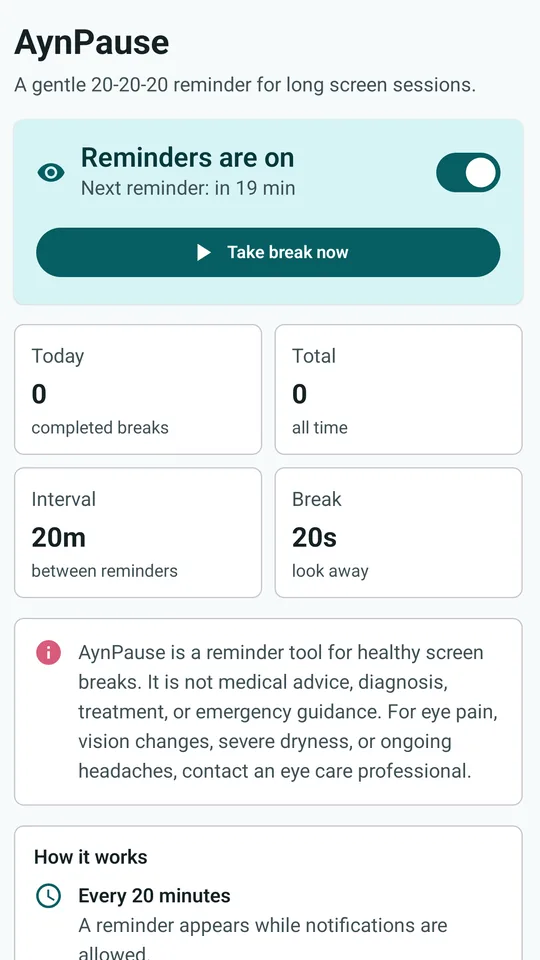
Switching reminders on
The Home screen has a switch: Reminders are on or Reminders are off. When on, it shows Next reminder: in N min, counting down and refreshing every 30 seconds. A Take break now button opens the break timer at any time. Four tiles show the day’s break count, the all-time total, the interval between reminders, and the break length. Reminders start switched off.
The Home screen. Reminders are on, next reminder in 19 minutes. Four tiles: Today 0 completed breaks, Total 0 all time, Interval 20m, Break 20s.
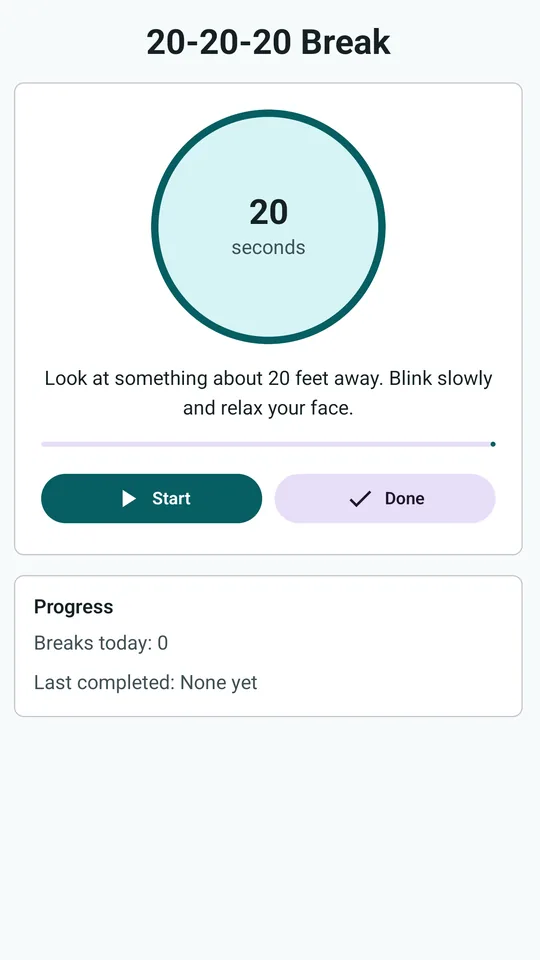
The break timer
The 20-20-20 Break screen shows a circle with the seconds left and the line “Look at something about 20 feet away. Blink slowly and relax your face.” Two buttons: Start (which becomes Restart while running) and Done. When the timer reaches zero it shows “Good. Your break is recorded.” and counts the break. Tapping Done before zero also counts it. The app cannot tell whether the person really looked away; it counts a finished timer or a tap on Done.
A Progress card underneath shows Breaks today and Last completed, or None yet.
The 20-20-20 Break screen. A 20-second circle timer, the look-away line, Start and Done buttons. Progress: Breaks today 0, Last completed None yet.
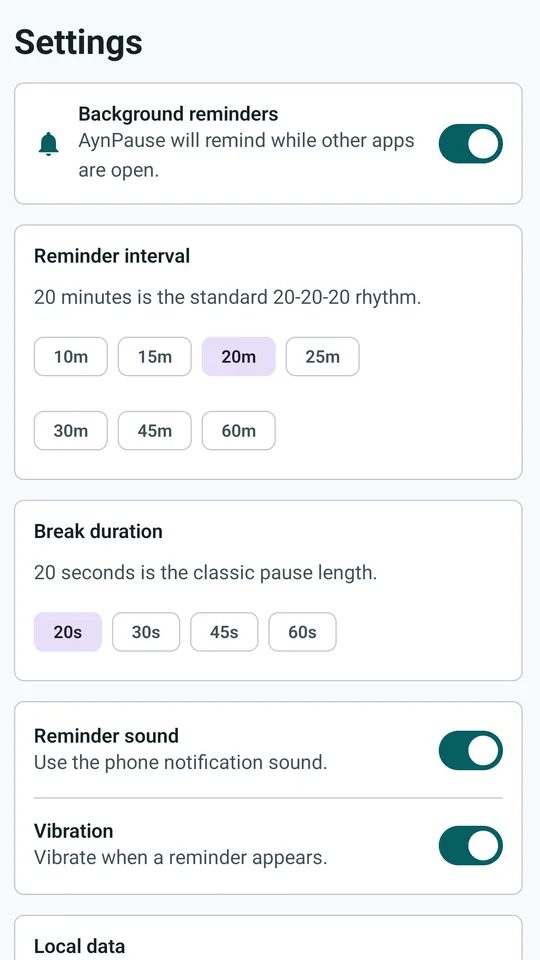
Settings: interval, break length, sound
In Settings: Background reminders (“AynPause will remind while other apps are open.”), Reminder interval with choices from 10 minutes to 60 minutes (the default is 20; the subtitle says “20 minutes is the standard 20-20-20 rhythm.”), Break duration with choices from 20 seconds to 60 seconds (the default is 20), Reminder sound and Vibration switches.
Under Local data it says: “Completed break counts are saved only on this device.” with a count and a Clear history button.
The Settings screen. Background reminders on, Reminder interval with 20m selected, Break duration with 20s selected, Reminder sound and Vibration on, Local data at the bottom.
How the reminder reaches you
The code sets an Android alarm that fires a notification even when the app is not open. The notification says “Time for a 20-20-20 eye break” and has three buttons: Start 20s (opens the timer), Done (counts a break and removes the notification), and Snooze 5 min (sets a new reminder in five minutes). The reminder appears only when Android notifications are allowed for the app; the app asks for permission on start.
The store listing says: “Reminder timing can also be delayed by Android battery saving or notification settings.” The code uses an inexact alarm, so Android may shift the exact time. I did not run the app on a phone, so I cannot say how reliably the reminder appears in practice.
Where it stops
- No screen-time measuring. It does not know how long you used a screen.
- No chart or history list beyond two counts (today and all time) and the time of the last break.
- No eye exercises, eye test, brightness, distance or posture advice.
- No account, sync, export, widget, or quiet hours.
- The store listing says it “is a personal reminder tool only” and “does not diagnose or treat eye strain, dry eye, headaches, vision changes, or any eye condition.”
- The app tells people with eye pain, vision changes, severe dryness or ongoing headaches to contact an eye care professional.
What it keeps, and where
Settings (on or off, interval, break length, sound, vibration), break counts and the time of the last break and the next reminder are kept in the app’s private storage on your phone. The app does not request the internet permission. Nothing is sent to the developer or to any third party; the privacy policy says the data “remain on your device until you delete them” and can be cleared inside the app, by uninstalling, or by clearing app storage. Android backup is disabled.
What I did not check
For this page I read the store listing, the project records, the code and the strings in it, and I opened all nine store pictures. No test exists in the project. I did not run the app on a phone, so I cannot say whether the reminder fires on time, whether it wakes a locked phone, or how the notification looks. I did not check the timer’s accuracy.
View AynPause on Google PlayNational Eye Institute
“Keep Your Eyes Healthy”, last updated September 11, 2025, from the US National Institutes of Health. Read in full. The one sentence on screen breaks is quoted above; the rest of the page covers dilated eye exams, food, exercise, sunglasses and protective eyewear, none of which this page uses.
American Academy of Ophthalmology
“Computers, Digital Devices, and Eye Strain”, published Jun. 27, 2024, reviewed by James M Huffman, MD. Read in full. The blink numbers, look up and away, brightness and contrast, and sitting position are quoted above. Its other tips (artificial tears, humidifier, computer eyeglasses, matte screen filter, VR) are not used.
Know someone who stares at a screen all day?
The 20-20-20 idea is one line. The rest is habit.